اجعل مستندات شركتك جاهزة للذكاء الاصطناعي — بشكل موثوق، داخل المؤسسة، وبطريقة دلالية.
من الشائع أن تحتفظ المؤسسات بوثائقها بصيغ PDF، DOCX، XLSX و ePub. بينما تعمل نماذج اللغة الكبيرة (LLMs) بشكل جيد مع HTML أو النص العادي، تحتاج هذه الصيغ الأصلية إلى تحويل قبل أن يمكن استخدامها بفعالية في خطوط أنابيب LLM + RAG حيث نرغب في الدردشة مع مستند أو مجموعة مستندات.
LLM (Large Language Model) — نموذج ذكاء اصطناعي مدرب مسبقًا يولد نصًا وإجابات بناءً على مجموعات نصية ضخمة.
RAG (Retrieval‑Augmented Generation) — نهج يجمع بين LLM وقاعدة معرفة خارجية (مثل المستندات المؤسسية) بحيث يمكن للنموذج استرجاع المحتوى المتخصص والتفكير فيه.
المخطط التسلسلي التالي يوضح الخطوات النموذجية لتوليد إجابة على سؤال:
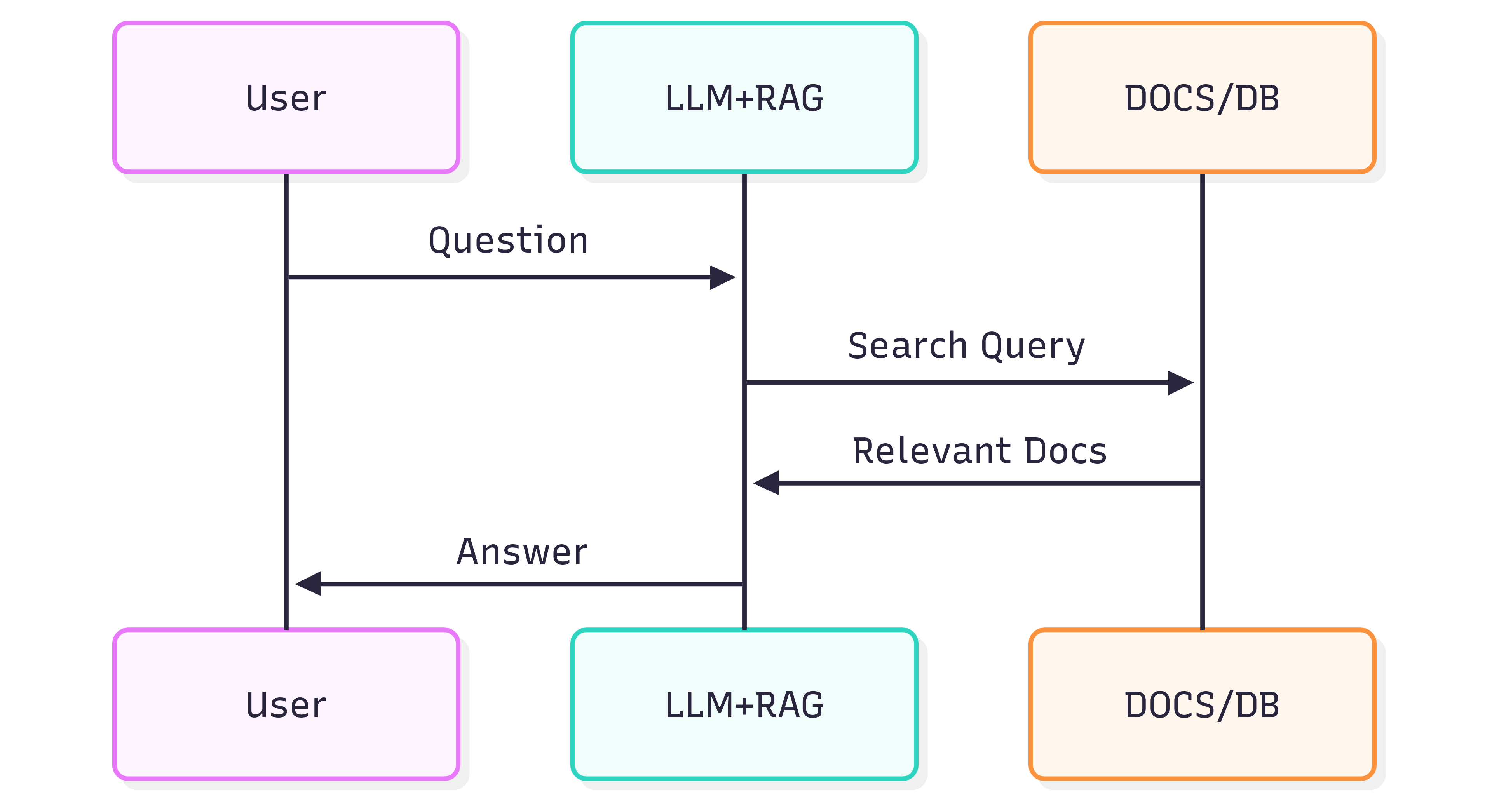
جودة الإجابات التي تحصل عليها من نظام (LLM + RAG) تعتمد على النظام نفسه وعلى مدى حفظ المستندات المصدرية لهياكله ومعانيه عند إدخاله في خط أنابيب الاسترجاع.
المشكلة
تنسيق المستند ليس بصريًا فقط — فهو يحمل دلالات. العناوين، القوائم، الجداول، التأكيد بالخط العريض/المائل، التسميات التوضيحية، والصور المدمجة كلها تنقل معنى يساعد LLM على فهم السياق. التحويل الساذج للمستندات (مثلاً باستخدام OCR يعامل كل صفحة كصورة مسطحة) غالبًا ما يفقد هذه الدلالات. وبالتالي قد تصبح استرجاعات RAG وإجابات LLM غير دقيقة أو مشوشة.
يمكن أن يساعد OCR في المستندات الممسوحة ضوئيًا لكنه غالبًا ما يزيل الهيكل (قوائم مقسمة عبر صفحات، حدود الجداول تُفسَّر خطأً، فقدان التعليقات التوضيحية). كما يضيف تكلفة وعبء بنية تحتية عند معالجة أرشيفات كبيرة.
الحل
نهج بديل هو تحليل المستندات مع الوعي الهيكلي وتصدير هذا الهيكل إلى صيغة دلالية صديقة لـ LLM — Markdown. Markdown خفيف الوزن، مدعوم على نطاق واسع، ويحافظ على العناوين، القوائم، الجداول، كتل الشيفرة، التأكيد، التسميات التوضيحية، وإشارات الصور — تمامًا الميزات التي تحسن جودة الاسترجاع.
GroupDocs.Markdown for .NET يحول صيغ المستندات الشائعة (PDF، DOCX، XLSX، ePub، وأكثر) إلى Markdown نظيف ودلالي مناسب للادخال في أنظمة RAG. إنها مكتبة .NET تُنَفَّذ داخل المؤسسة، لذا جميع المعالجة تتم داخل بيئتك — لا خدمات خارجية، لا تسرب بيانات، ولا اعتماد على وحدات معالجة رسومية عن بُعد.
كيفية البدء
GroupDocs.Markdown for .NET متوفر كحزمة NuGet، وكذلك كملفات MSI وZIP للتنزيل.
ثبت حزمة NuGet باستخدام سطر أوامر .NET:
dotnet add package GroupDocs.Markdown
أو حمّل المثبتات والملفات التجميعية من صفحة التنزيل الرسمية: https://releases.groupdocs.com/markdown/net/
مثال على الاستخدام (أضفه إلى Program.cs):
// Import the namespace
using GroupDocs.Markdown;

// Set the license (optional for evaluation)
License.Set("GroupDocs.Markdown.lic");

// Instantiate the converter for a source document
var converter = new MarkdownConverter("rich-text-formatting.docx");

// Convert and save output to file
converter.Convert("rich-text-formatting.md");
سيتم حفظ الملف rich-text-formatting.md المحوَّل في نفس المجلد الذي يحتوي تطبيقك.
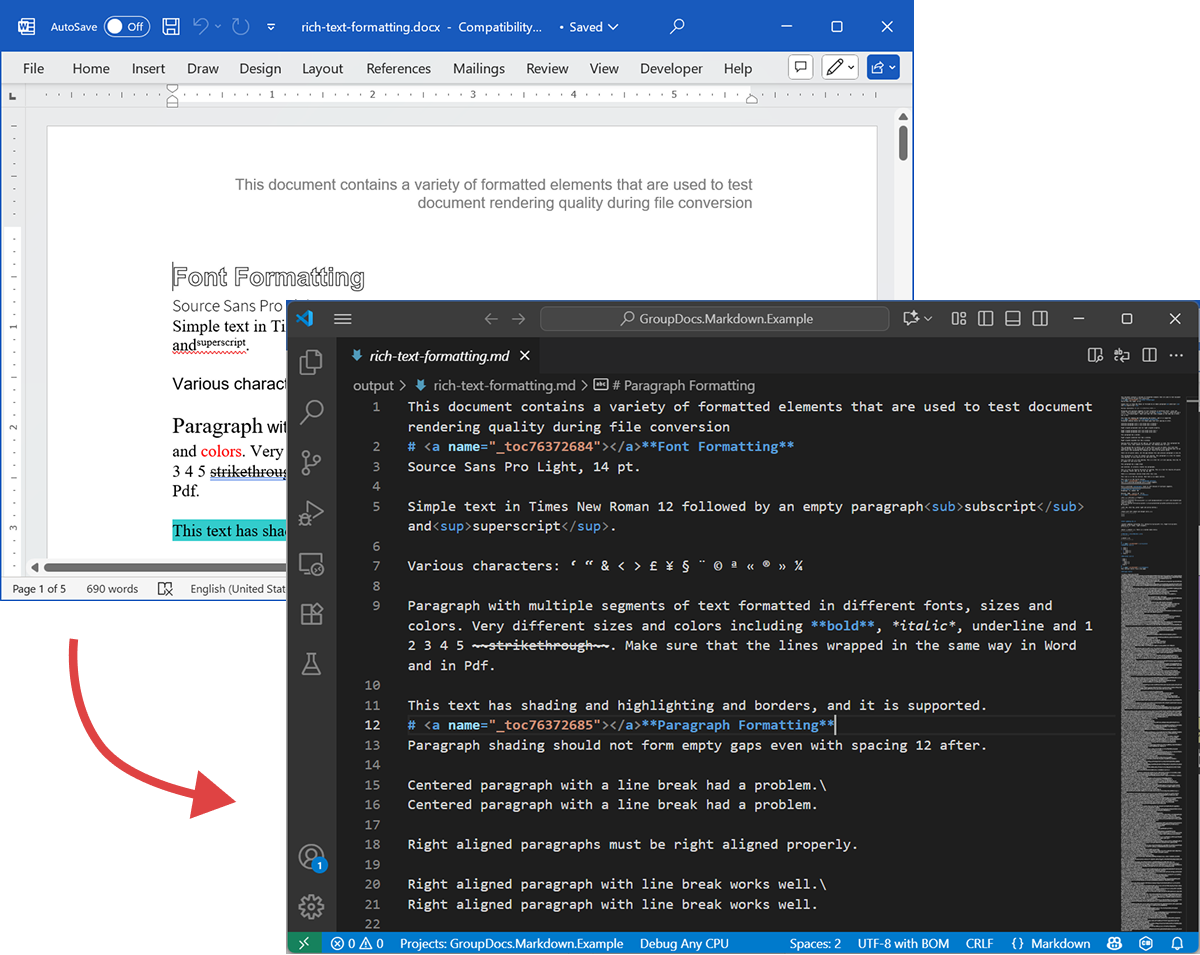
الصورة التالية تُظهر ملف DOCX الإدخالي وملف Markdown الناتج.
إذا شغلت البرنامج بدون ترخيص، سيعمل وضع التقييم على معالجة عدد محدود من الصفحات (مثلاً، الصفحات الثلاث الأولى). لتجربة المنتج بالكامل، اطلب ترخيصًا مؤقتًا.
لطلب ترخيص مؤقت، افتح معالج الشراء (Purchase Wizard) عبر الرابط https://purchase.groupdocs.com/buy/cart?ppId=115659&utm_source=blog، قدِّم تفاصيل الاتصال، وانقر احصل على ترخيص مؤقت في خطوة تفاصيل الاتصال. سيُرسل الترخيص المؤقت إلى بريدك الإلكتروني.
تعرف على المزيد حول التراخيص المؤقتة: https://purchase.groupdocs.com/temporary-license/.
صيغ الملفات المدعومة
GroupDocs.Markdown for .NET يدعم مجموعة واسعة من صيغ المؤسسات والكتب الإلكترونية. القائمة الكاملة للامتدادات المدعومة:
- PDF
pdf
- جداول البيانات
.xls,.xlsx,.xlsb,.xlsm,.xlt,.xltx,.xltm,.xlam,.csv,.tsv,.ods,.ots,.fods,.numbers,.sxc
- Word / نص غني
.doc,.docx,.dot,.dotm,.dotx,.docm,.rtf,.odt,.ott
- الكتب الإلكترونية
.azw3,.mobi,.epub
- نص / ترميز / مساعدة
.chm,.xml,.txt
كيف يعمل (الداخلية — مستوى عال)
عند معالجة مستند، تحدث مرحلتان رئيسيتان:
-
استخراج نموذج المستند
يُحلَّل المستند إلى نموذج كائنات في الذاكرة يمثل العناصر الهيكلية (فقرات، عناوين، قوائم، جداول، صور، حواشي، تعليقات توضيحية، إلخ). يسعى المحلل إلى الحفاظ على الدلالات (مثل تعشيق القوائم، خلايا الجداول، وتسميات الصور). -
توليد Markdown
يُمشى على نموذج الكائنات ويُحوَّل إلى Markdown وفقًا لخيارات التحويل القابلة للتكوين (كيفية التعامل مع الصور، تنسيق الجداول، مستويات العناوين، التعليقات الخاصة، إلخ). النتيجة ملف Markdown قابل للقراءة، ذو معنى دلالي، جاهز للفهرسة بواسطة خط أنابيب RAG الخاص بك.
مثال على التصدير
الكود أعلاه يوضح كيفية تصدير DOCX إلى Markdown. دعنا نأخذ هذا المثال ونستعرض ملفات المصدر والناتج كعرض توضيحي.
DOCX المصدر
الملف المصدر rich-text-formatting.docx يحتوي على كتل محتوى متنوعة ومُنسَّق بشكل مكثف لتسليط الضوء على العناصر الدلالية الرئيسية.
Markdown الناتج
المحتوى الناتج من rich-text-formatting.md موضح أدناه، مبينًا كيف تُمثَّل عناصر التنسيق المختلفة في ملف Markdown المُولَّد.
This document contains a variety of formatted elements that are used to test document rendering quality during file conversion
# <a name="_toc76372684"></a>**Font Formatting**
Source Sans Pro Light, 14 pt.
Simple text in Times New Roman 12 followed by an empty paragraph<sub>subscript</sub> and<sup>superscript</sup>.
Various characters: ‘ “ & < > £ ¥ § ¨ © ª « ® » ¼
Paragraph with multiple segments of text formatted in different fonts, sizes and colors. Very different sizes and colors including **bold**, *italic*, underline and 1 2 3 4 5 ~~strikethrough~~. Make sure that the lines wrapped in the same way in Word and in Pdf.
This text has shading and highlighting and borders, and it is supported.
# <a name="_toc76372685"></a>**Paragraph Formatting**
Paragraph shading should not form empty gaps even with spacing 12 after.
Centered paragraph with a line break had a problem.\
Centered paragraph with a line break had a problem.
Right aligned paragraphs must be right aligned properly.
Right aligned paragraph with line break works well.\
Right aligned paragraph with line break works well.
This paragraph has a border.
Right aligned condensed text had a problem.
Right aligned expanded text had a problem.
Spacing after and before do not add up, just the greater is used. This paragraph has 12 after. Also, when indents are different, the shading does not join.
This paragraph has 12 before, but in total there is only 12 above. Also note that shading belongs to the paragraph at the top and shading of this paragraph does not go down unless next paragraph has shading too. There are 24 points below.
There are 24 points above, but the gap between this and previous paragraph is only 24.
This paragraph is a test for double line spacing. This paragraph is a test for double line spacing. It also have 0.5” for the first line.
This is a test for 1.5 line spacing. This is a test for 1.5 line spacing. Also has -0.5” indent for the first line.
This paragraph has a page break
and centered. It actually creates two paragraphs.
This is a test for Exactly 20 points of spacing. This is a test for Exactly 20 points of spacing. TTTTTT (20, 22, 24, 26, 28, 30).
There is a continuous section break after this line.
This line is in the new section. Next here is an empty section.
This line is in the fourth section.
# <a name="_toc76372686"></a>**Paragraph Justify**
This is a justified paragraph with a single segment. 111111111111111111111111111111111111111111.
Also a justified **paragraph** reset to left because of multiple segments. 111111111111111111111111111111111111111111.
# **Non-English Characters**
Wingdings: (x, Symbol: WÄ
Russian: Теперь немного по русски.
# <a name="_toc76372687"></a>**Tables**
|Cell 1.1 Left|Cell 1.2 Right|||
| :- | -: | :- | :- |
|Cell 2.1 Centered vertically|Cell 2.2 with background|Cell 2.3 with line break<br>and coloured border.||
|Cell 3.1 Bottom vertically|<p>Cell 3.2</p><p>Centered</p><p>Horizontally</p>|Cell 3.3 No border||
|Left red, blue top, green right and yellow bottom.|
| :- |
|Table with left indent and merged cells.||||
| :- | :- | :- | :- |
|||||
|||||
**Cell padding etc.**
|<p>Cell padding.</p><p>Top: 0.1, bottom 0.2</p><p>Left: 0.5, Right 0.4</p>|Zero padding on all sides, right aligned.|
| :- | -: |
|Outer 1.1|Outer 1.2. There is a nested table here||
| :- | :-: | -: |
|**Nested 1.1**|**Nested 1.2**|
| :- | :- |
|||Outer 1.3|
| :- | :-: | -: |
#
# <a name="_toc76372688"></a>**Lists**
**Numbered list:**
1. Item 1
1. Item 2
1. Item 2.1
1. Item 2.2
1. Item 3
**Bulleted list:**
- Item 1
- Item 2
- Item 2.1
- Item 2.2
- Item 3
#
# <a name="_toc76372689"></a>**Images**
This section starts from a new page.
**Ellipse text**
There is an image in a black border in the top right corner, but it will drop down into the text. There is also a transparent ellipse with text that overlaps the picture.
Inline JPEG in a separate paragraph.

Inline GIF scaled 50% and WMF scaled 25% in a paragraph. This text is before the image and  this text is after the image.
Images in a table. Left and right aligned.
|||
| :- | -: |
Inline text box  is here and inline ellipse  is here.
New section that starts from a new page is here.
It has portrait orientation and margins.
# <a name="_toc76372690"></a>**Fields**
Merge field «FirstName»
Page number 5
Hyperlink [Aspose.com](http://www.aspose.com)
TOC
[Font Formatting 1](#_toc76372684)
[Paragraph Formatting 1](#_toc76372685)
[Non-English Characters 2](#_toc76372686)
[Tables 2](#_toc76372687)
[Lists 2](#_toc76372688)
[Images 4](#_toc76372689)
[Fields 5](#_toc76372690)
# **Form Fields**
Edit <a name="text1"></a>test text
Checkbox <a name="check1"></a>
Combobox <a name="dropdown1"></a>
# **Footnotes and Endnotes**
This line has a footnote at the end.[^1]
This line has an endnote at the end.[^2]
[^1]: Footnote 1.
[^2]: Endnote 1.
الخلاصة
GroupDocs.Markdown for .NET يساعدك على تحويل مجموعة واسعة من صيغ المستندات إلى Markdown دلالي جاهز لأنظمة LLM + RAG. يحافظ على بنية المستند ومعانيه، يعمل داخل المؤسسة، ويدعم صيغ المؤسسات الشائعة — مما يجعله خيارًا عمليًا للمنظمات التي تحتاج إلى إعداد مجموعات مستندات ضخمة للاستهلاك الذكي.
تعرف على المزيد
- الصفحة الرئيسية للمنتج: https://products.groupdocs.com/markdown/net/
- الوثائق: https://docs.groupdocs.com/markdown/net/
- معلومات الترخيص: https://about.groupdocs.com/legal/
- التنزيلات: https://releases.groupdocs.com/markdown/net/
الدعم والتعليقات
لأي أسئلة أو مساعدة تقنية، يرجى استخدام منتدى الدعم المجاني (Free Support Forum) عبر الرابط https://forum.groupdocs.com/ — سنكون سعداء بمساعدتك.