Rendez vos documents d’entreprise prêts pour l’IA — de manière fiable, sur site et sémantiquement.
Il est très fréquent que les organisations conservent leur documentation aux formats PDF, DOCX, XLSX et ePub. Alors que les LLM (large language models) fonctionnent bien avec le HTML ou le texte brut, ces formats de documents natifs nécessitent une conversion avant de pouvoir être utilisés efficacement dans des pipelines LLM + RAG où l’on souhaite discuter avec un document ou un ensemble de documents.
LLM (Large Language Model) — un modèle d’IA pré‑entraîné qui génère du texte et des réponses à partir de grands corpus textuels.
RAG (Retrieval‑Augmented Generation) — une approche qui combine un LLM avec une base de connaissances externe (par exemple, des documents d’entreprise) afin que le modèle puisse récupérer et raisonner sur le contenu du domaine.
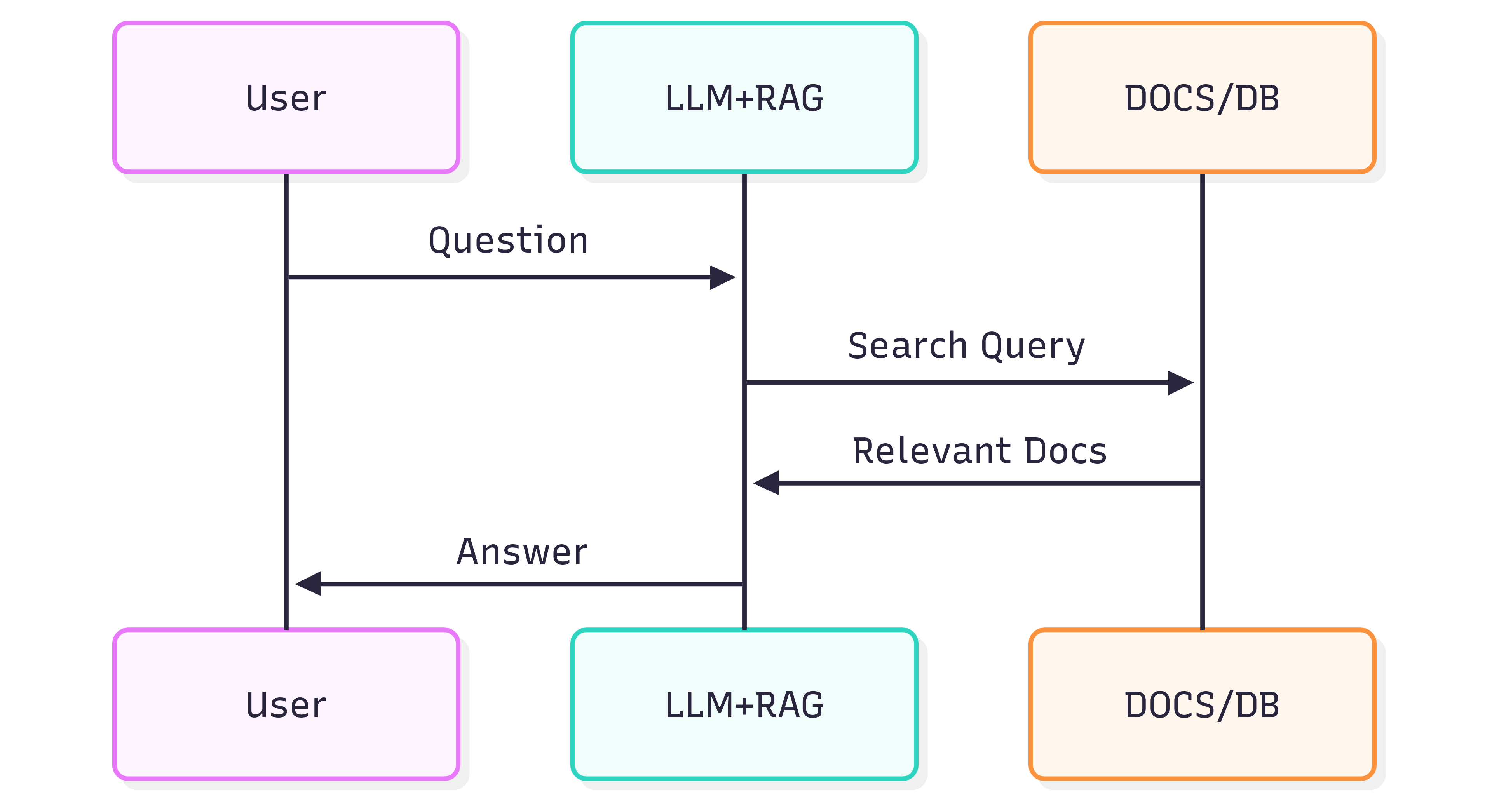
Le diagramme de séquence suivant illustre les étapes typiques impliquées dans la génération d’une réponse à une question :
La qualité des réponses que vous obtenez d’un système (LLM + RAG) dépend à la fois du système lui‑même et de la façon dont les documents sources conservent leur structure et leur sens lorsqu’ils sont introduits dans le pipeline de récupération.
Le problème
Le formatage des documents n’est pas seulement visuel — il porte une sémantique. Les titres, listes, tableaux, le gras/italique, les légendes et les images intégrées transmettent tous un sens qui aide un LLM à comprendre le contexte. Convertir naïvement les documents (par exemple, en utilisant l’OCR qui traite chaque page comme une image plate) fait souvent perdre ces sémantiques. En conséquence, la récupération RAG et les réponses LLM en aval peuvent devenir inexactes ou bruyantes.
L’OCR peut aider pour les documents numérisés mais supprime fréquemment la structure (listes découpées sur plusieurs pages, bordures de tableau mal interprétées, annotations perdues). Il ajoute également un coût et une surcharge d’infrastructure lors du traitement de grands archives.
La solution
Une approche alternative consiste à analyser les documents avec une prise de conscience structurelle et à exporter cette structure vers un format sémantique, compatible LLM — le Markdown. Le Markdown est léger, largement supporté et préserve les titres, listes, tableaux, blocs de code, emphases, légendes et références d’images — exactement les fonctionnalités qui améliorent la qualité de la récupération.
GroupDocs.Markdown for .NET convertit les formats de documents populaires (PDF, DOCX, XLSX, ePub, et plus) en Markdown propre et sémantique, adapté à l’ingestion dans les systèmes RAG. C’est une bibliothèque .NET on‑premise, donc tout le traitement se déroule dans votre environnement — aucune service externe, aucune fuite de données, et aucune dépendance à des GPU distants.
Comment démarrer
GroupDocs.Markdown for .NET est disponible en tant que package NuGet, ainsi qu’en téléchargements MSI et ZIP.
Installez le package NuGet avec la CLI .NET :
dotnet add package GroupDocs.Markdown
Ou téléchargez les installateurs et les assemblages depuis la page officielle des téléchargements : https://releases.groupdocs.com/markdown/net/
Exemple d’utilisation (ajoutez à Program.cs) :
// Import the namespace
using GroupDocs.Markdown;

// Set the license (optional for evaluation)
License.Set("GroupDocs.Markdown.lic");

// Instantiate the converter for a source document
var converter = new MarkdownConverter("rich-text-formatting.docx");

// Convert and save output to file
converter.Convert("rich-text-formatting.md");
Le fichier rich-text-formatting.md converti sera enregistré dans le même dossier que votre application.
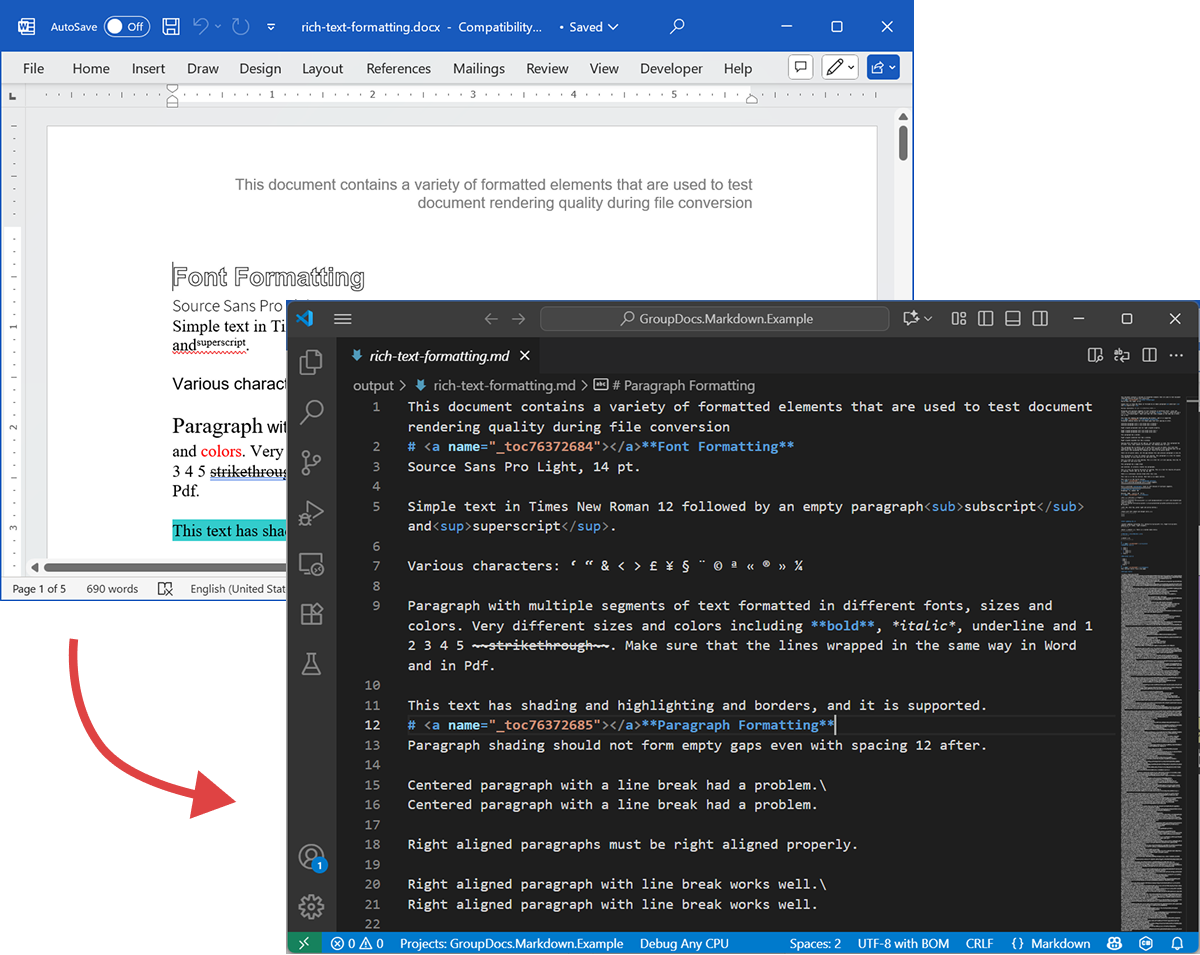
La capture d’écran suivante montre le fichier DOCX d’entrée et le Markdown de sortie.
Si vous exécutez sans licence, le mode d’évaluation traitera un nombre limité de pages (par exemple, les trois premières pages). Pour essayer le produit complet, demandez une licence temporaire.
Pour demander une licence temporaire, ouvrez l’Assistant d’achat, fournissez vos coordonnées et cliquez sur Get a temporary license à l’étape Contact Details. La licence temporaire vous sera envoyée par e‑mail.
En savoir plus sur les licences temporaires : https://purchase.groupdocs.com/temporary-license/.
Formats de fichiers pris en charge
GroupDocs.Markdown for .NET prend en charge un large ensemble de formats d’entreprise et d’e‑books courants. La liste complète des extensions supportées :
- PDF
pdf
- Feuilles de calcul
.xls,.xlsx,.xlsb,.xlsm,.xlt,.xltx,.xltm,.xlam,.csv,.tsv,.ods,.ots,.fods,.numbers,.sxc
- Word / Rich Text
.doc,.docx,.dot,.dotm,.dotx,.docm,.rtf,.odt,.ott
- Ebooks
.azw3,.mobi,.epub
- Texte / Balises / Aide
.chm,.xml,.txt
Comment ça fonctionne (interne — haut niveau)
Lorsqu’un document est traité, deux phases principales se produisent :
-
Extraction du modèle de document
Le document est analysé en un modèle d’objets en mémoire qui représente les éléments structurels (paragraphes, titres, listes, tableaux, images, notes de bas de page, annotations, etc.). L’analyseur s’efforce de préserver la sémantique (par exemple, l’imbrication des listes, les cellules de tableau et les légendes d’images). -
Génération de Markdown
Le modèle d’objets est parcouru et converti en Markdown selon des options de conversion configurables (comment gérer les images, le formatage des tableaux, les niveaux de titres, les annotations spéciales, etc.). Le résultat est un fichier Markdown lisible et sémantiquement riche, prêt à être indexé par votre pipeline RAG.
Exemple d’exportation
L’exemple de code ci‑dessus montre comment exporter un DOCX en Markdown. Prenons cet exemple de code et examinons les fichiers source et de sortie à titre de démonstration.
DOCX source
Le fichier source rich-text-formatting.docx contient divers blocs de contenu et est fortement formaté pour mettre en évidence les principaux éléments sémantiques.
Markdown de sortie
Le contenu de sortie de rich-text-formatting.md est fourni ci‑dessous, montrant comment les différents éléments de formatage sont représentés dans le fichier Markdown généré.
This document contains a variety of formatted elements that are used to test document rendering quality during file conversion
# <a name="_toc76372684"></a>**Font Formatting**
Source Sans Pro Light, 14 pt.
Simple text in Times New Roman 12 followed by an empty paragraph<sub>subscript</sub> and<sup>superscript</sup>.
Various characters: ‘ “ & < > £ ¥ § ¨ © ª « ® » ¼
Paragraph with multiple segments of text formatted in different fonts, sizes and colors. Very different sizes and colors including **bold**, *italic*, underline and 1 2 3 4 5 ~~strikethrough~~. Make sure that the lines wrapped in the same way in Word and in Pdf.
This text has shading and highlighting and borders, and it is supported.
# <a name="_toc76372685"></a>**Paragraph Formatting**
Paragraph shading should not form empty gaps even with spacing 12 after.
Centered paragraph with a line break had a problem.\
Centered paragraph with a line break had a problem.
Right aligned paragraphs must be right aligned properly.
Right aligned paragraph with line break works well.\
Right aligned paragraph with line break works well.
This paragraph has a border.
Right aligned condensed text had a problem.
Right aligned expanded text had a problem.
Spacing after and before do not add up, just the greater is used. This paragraph has 12 after. Also, when indents are different, the shading does not join.
This paragraph has 12 before, but in total there is only 12 above. Also note that shading belongs to the paragraph at the top and shading of this paragraph does not go down unless next paragraph has shading too. There are 24 points below.
There are 24 points above, but the gap between this and previous paragraph is only 24.
This paragraph is a test for double line spacing. This paragraph is a test for double line spacing. It also have 0.5” for the first line.
This is a test for 1.5 line spacing. This is a test for 1.5 line spacing. Also has -0.5” indent for the first line.
This paragraph has a page break
and centered. It actually creates two paragraphs.
This is a test for Exactly 20 points of spacing. This is a test for Exactly 20 points of spacing. TTTTTT (20, 22, 24, 26, 28, 30).
There is a continuous section break after this line.
This line is in the new section. Next here is an empty section.
This line is in the fourth section.
# <a name="_toc76372686"></a>**Paragraph Justify**
This is a justified paragraph with a single segment. 111111111111111111111111111111111111111111.
Also a justified **paragraph** reset to left because of multiple segments. 111111111111111111111111111111111111111111.
# **Non-English Characters**
Wingdings: (x, Symbol: WÄ
Russian: Теперь немного по русски.
# <a name="_toc76372687"></a>**Tables**
|Cell 1.1 Left|Cell 1.2 Right|||
| :- | -: | :- | :- |
|Cell 2.1 Centered vertically|Cell 2.2 with background|Cell 2.3 with line break<br>and coloured border.||
|Cell 3.1 Bottom vertically|<p>Cell 3.2</p><p>Centered</p><p>Horizontally</p>|Cell 3.3 No border||
|Left red, blue top, green right and yellow bottom.|
| :- |
|Table with left indent and merged cells.||||
| :- | :- | :- | :- |
|||||
|||||
**Cell padding etc.**
|<p>Cell padding.</p><p>Top: 0.1, bottom 0.2</p><p>Left: 0.5, Right 0.4</p>|Zero padding on all sides, right aligned.|
| :- | -: |
|Outer 1.1|Outer 1.2. There is a nested table here||
| :- | :-: | -: |
|**Nested 1.1**|**Nested 1.2**|
| :- | :- |
|||Outer 1.3|
| :- | :-: | -: |
#
# <a name="_toc76372688"></a>**Lists**
**Numbered list:**
1. Item 1
1. Item 2
1. Item 2.1
1. Item 2.2
1. Item 3
**Bulleted list:**
- Item 1
- Item 2
- Item 2.1
- Item 2.2
- Item 3
#
# <a name="_toc76372689"></a>**Images**
This section starts from a new page.
**Ellipse text**
There is an image in a black border in the top right corner, but it will drop down into the text. There is also a transparent ellipse with text that overlaps the picture.
Inline JPEG in a separate paragraph.

Inline GIF scaled 50% and WMF scaled 25% in a paragraph. This text is before the image and  this text is after the image.
Images in a table. Left and right aligned.
|||
| :- | -: |
Inline text box  is here and inline ellipse  is here.
New section that starts from a new page is here.
It has portrait orientation and margins.
# <a name="_toc76372690"></a>**Fields**
Merge field «FirstName»
Page number 5
Hyperlink [Aspose.com](http://www.aspose.com)
TOC
[Font Formatting 1](#_toc76372684)
[Paragraph Formatting 1](#_toc76372685)
[Non-English Characters 2](#_toc76372686)
[Tables 2](#_toc76372687)
[Lists 2](#_toc76372688)
[Images 4](#_toc76372689)
[Fields 5](#_toc76372690)
# **Form Fields**
Edit <a name="text1"></a>test text
Checkbox <a name="check1"></a>
Combobox <a name="dropdown1"></a>
# **Footnotes and Endnotes**
This line has a footnote at the end.[^1]
This line has an endnote at the end.[^2]
[^1]: Footnote 1.
[^2]: Endnote 1.
Résumé
GroupDocs.Markdown for .NET vous aide à convertir un large éventail de formats de documents en Markdown sémantique prêt pour les systèmes LLM + RAG. Il préserve la structure et le sens du document, fonctionne sur site et prend en charge les formats d’entreprise courants — ce qui en fait un choix pratique pour les organisations qui doivent préparer de grandes collections de documents pour la consommation par l’IA.
En savoir plus
- Page produit : https://products.groupdocs.com/markdown/net/
- Documentation : https://docs.groupdocs.com/markdown/net/
- Informations sur la licence : https://about.groupdocs.com/legal/
- Téléchargements : https://releases.groupdocs.com/markdown/net/
Support et retours
Pour des questions ou une assistance technique, veuillez utiliser notre Free Support Forum — nous serons heureux de vous aider.