הפכו את המסמכים הארגוניים שלכם למוכנים ל‑AI — באופן אמין, במקומי, ובאופן סמנטי.
זה מקרה נפוץ שהארגונים שומרים את התיעוד שלהם בפורמטים PDF, DOCX, XLSX ו‑ePub. בעוד שמודלים גדולים של שפה (LLM) עובדים היטב עם HTML או טקסט פשוט, פורמטים מקומיים של מסמכים דורשים המרה לפני שניתן להשתמש בהם ביעילות בצינורות LLM + RAG שבהם אנו רוצים לשוחח עם מסמך או קבוצת מסמכים.
LLM (Large Language Model) — מודל AI מאומן מראש שמייצר טקסט ותשובות על בסיס קורפוסים גדולים של טקסט.
RAG (Retrieval‑Augmented Generation) — גישה המשלבת מודל LLM עם מאגר ידע חיצוני (למשל, מסמכים ארגוניים) כך שהמודל יכול לאחזר ולנתח תוכן תחום.
הדיאגרמת רצף הבאה ממחישה את השלבים האופייניים ליצירת תשובה לשאלה:
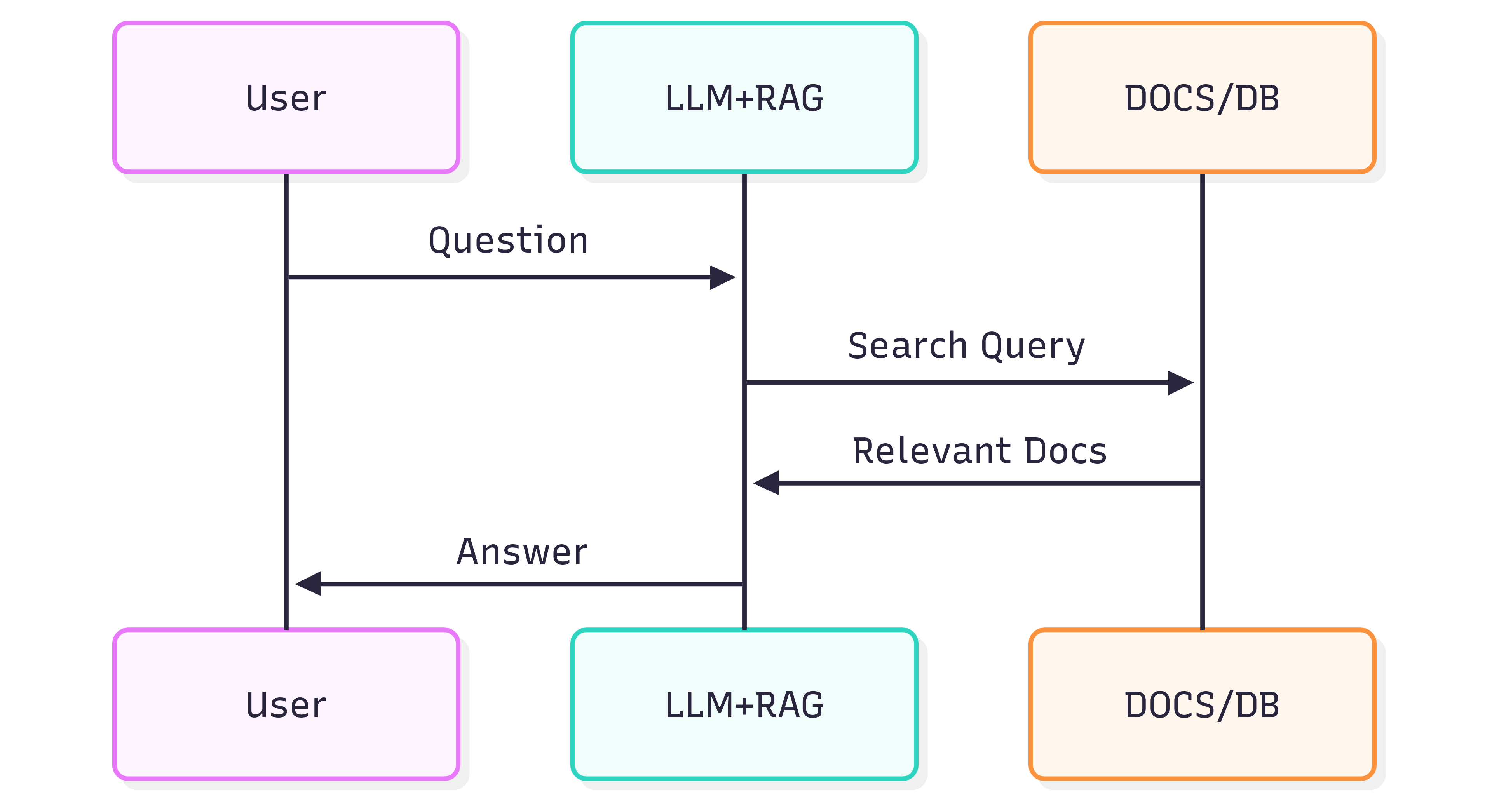
איכות התשובות שמתקבלות ממערכת (LLM + RAG) תלויה הן במערכת עצמה והן במידת השמירה על המבנה והמשמעות של המסמכים המקוריים כאשר הם מוזנים לצינור האחזור.
הבעיה
עיצוב מסמך אינו רק חזותי — הוא נושא משמעות. כותרות, רשימות, טבלאות, הדגשה בעובי/נטייה, כיתובים ותמונות משולבות מעבירים משמעות שעוזרת ל‑LLM להבין הקשר. המרה חפה של מסמכים (למשל, באמצעות OCR המתייחס לכל דף כתמונה שטוחה) לעיתים קרובות מאבדת את המשמעויות הללו. כתוצאה מכך, האחזור ב‑RAG והתשובות של ה‑LLM עלולים להיות לא מדויקים או רועשים.
OCR יכול לעזור למסמכים סרוקים אך לעיתים קרובות מסיר מבנה (רשימות שמפוצלות על פני דפים, גבולות טבלאות שמפורשים באופן שגוי, אנוטציות שאבדו). בנוסף, הוא מוסיף עלות ועומס תשתיתי בעת עיבוד ארכיונים גדולים.
הפתרון
גישה חלופית היא לנתח מסמכים עם מודעות למבנה ולייצא את המבנה הזה לפורמט סמנטי ידידותי ל‑LLM — Markdown. Markdown הוא קל משקל, נתמך נרחבות, ומשמר כותרות, רשימות, טבלאות, בלוקי קוד, הדגשה, כיתובים והפניות לתמונות — בדיוק התכונות שמשפרות את איכות האחזור.
GroupDocs.Markdown for .NET ממיר פורמטים פופולריים של מסמכים (PDF, DOCX, XLSX, ePub ועוד) ל‑Markdown נקי וסמנטי המתאים לשילוב במערכות RAG. מדובר בספרייה .NET הפועלת במקומי, כך שכל העיבוד מתבצע בסביבה שלכם — ללא שירותים חיצוניים, ללא דליפת נתונים וללא תלות ב‑GPU מרוחק.
איך להתחיל
GroupDocs.Markdown for .NET זמינה כחבילה ב‑NuGet, וכן כהורדות MSI ו‑ZIP.
התקנת חבילת NuGet באמצעות .NET CLI:
dotnet add package GroupDocs.Markdown
או הורדת מתקינים והרכבות מדף ההורדות הרשמי: https://releases.groupdocs.com/markdown/net/
דוגמת שימוש (הוספה ל‑Program.cs):
// Import the namespace
using GroupDocs.Markdown;

// Set the license (optional for evaluation)
License.Set("GroupDocs.Markdown.lic");

// Instantiate the converter for a source document
var converter = new MarkdownConverter("rich-text-formatting.docx");

// Convert and save output to file
converter.Convert("rich-text-formatting.md");
קובץ rich-text-formatting.md המומר יישמר באותו תיקייה שבה נמצא היישום שלכם.
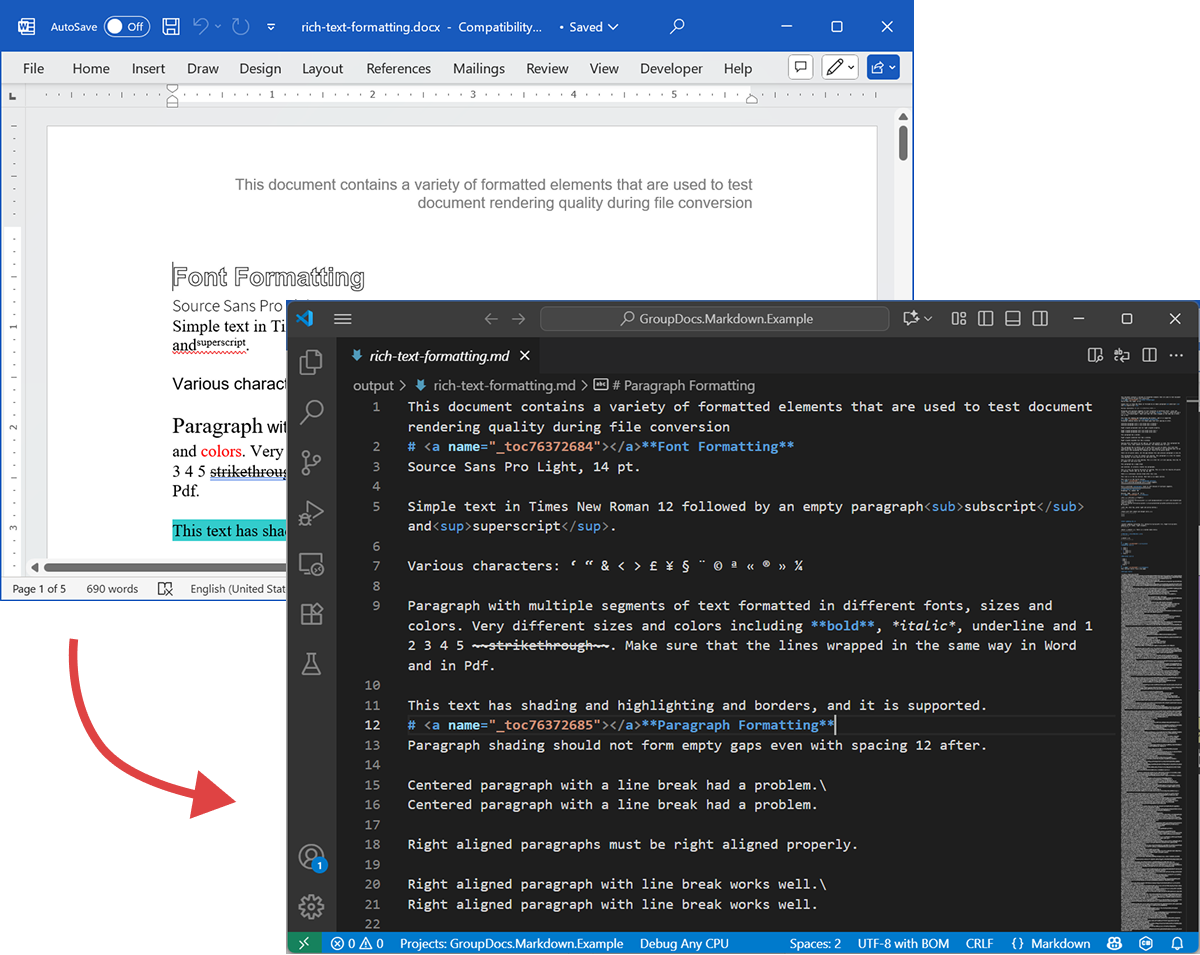
הצילום הבא מציג קובץ DOCX קלט וקובץ Markdown פלט.
אם תריצו ללא רישיון, מצב ההערכה יעבד מספר מוגבל של דפים (למשל, שלושת הדפים הראשונים). כדי לנסות את המוצר במלואו, בקשו רישיון זמני.
כדי לבקש רישיון זמני, פתחו את Purchase Wizard, הזינו פרטי קשר ולחצו על Get a temporary license בשלב Contact Details. הרישיון הזמני יישלח אליכם במייל.
למידע נוסף על רישיונות זמניים: https://purchase.groupdocs.com/temporary-license/.
פורמטים נתמכים
GroupDocs.Markdown for .NET תומכת במגוון רחב של פורמטים ארגוניים ו‑ebook. הרשימה המלאה של ההרחבות הנתמכות:
- PDF
pdf
- גיליונות אלקטרוניים
.xls,.xlsx,.xlsb,.xlsm,.xlt,.xltx,.xltm,.xlam,.csv,.tsv,.ods,.ots,.fods,.numbers,.sxc
- Word / טקסט עשיר
.doc,.docx,.dot,.dotm,.dotx,.docm,.rtf,.odt,.ott
- Ebooks
.azw3,.mobi,.epub
- טקסט / סימון / עזרה
.chm,.xml,.txt
איך זה עובד (פנימיות — רמה גבוהה)
כאשר מסמך מעובד, מתרחשות שתי שלבים עיקריים:
-
חילוץ מודל המסמך
המסמך מנותח למודל אובייקטים בזיכרון המייצג אלמנטים מבניים (פסקאות, כותרות, רשימות, טבלאות, תמונות, הערות שוליים, אנוטציות וכו’). המפרש שואף לשמר את המשמעויות (למשל, קידוד רשימות, תאי טבלה, וכיתובי תמונות). -
יצירת Markdown
מודל האובייקטים נצעד ומומר ל‑Markdown בהתאם לאפשרויות המרה שניתן להגדיר (כיצד לטפל בתמונות, עיצוב טבלאות, רמות כותרות, אנוטציות מיוחדות וכו’). התוצאה היא קובץ Markdown קריא, בעל משמעות סמנטית, מוכן לאינדוקס על‑ידי צינור ה‑RAG שלכם.
דוגמת ייצוא
קוד הדוגמה שלמעלה מציג כיצד לייצא DOCX ל‑Markdown. נשתמש בדוגמה זו ונבחן את קבצי המקור והפלט כהדגמה.
DOCX מקור
קובץ המקור rich-text-formatting.docx מכיל בלוקים שונים של תוכן והוא מעוצב במידה רבה כדי להדגיש את האלמנטים הסמנטיים העיקריים.
Markdown פלט
תוכן הפלט של rich-text-formatting.md מוצג למטה, ומציג כיצד אלמנטים שונים של עיצוב מיוצגים בקובץ Markdown שנוצר.
This document contains a variety of formatted elements that are used to test document rendering quality during file conversion
# <a name="_toc76372684"></a>**Font Formatting**
Source Sans Pro Light, 14 pt.
Simple text in Times New Roman 12 followed by an empty paragraph<sub>subscript</sub> and<sup>superscript</sup>.
Various characters: ‘ “ & < > £ ¥ § ¨ © ª « ® » ¼
Paragraph with multiple segments of text formatted in different fonts, sizes and colors. Very different sizes and colors including **bold**, *italic*, underline and 1 2 3 4 5 ~~strikethrough~~. Make sure that the lines wrapped in the same way in Word and in Pdf.
This text has shading and highlighting and borders, and it is supported.
# <a name="_toc76372685"></a>**Paragraph Formatting**
Paragraph shading should not form empty gaps even with spacing 12 after.
Centered paragraph with a line break had a problem.\
Centered paragraph with a line break had a problem.
Right aligned paragraphs must be right aligned properly.
Right aligned paragraph with line break works well.\
Right aligned paragraph with line break works well.
This paragraph has a border.
Right aligned condensed text had a problem.
Right aligned expanded text had a problem.
Spacing after and before do not add up, just the greater is used. This paragraph has 12 after. Also, when indents are different, the shading does not join.
This paragraph has 12 before, but in total there is only 12 above. Also note that shading belongs to the paragraph at the top and shading of this paragraph does not go down unless next paragraph has shading too. There are 24 points below.
There are 24 points above, but the gap between this and previous paragraph is only 24.
This paragraph is a test for double line spacing. This paragraph is a test for double line spacing. It also have 0.5” for the first line.
This is a test for 1.5 line spacing. This is a test for 1.5 line spacing. Also has -0.5” indent for the first line.
This paragraph has a page break
and centered. It actually creates two paragraphs.
This is a test for Exactly 20 points of spacing. This is a test for Exactly 20 points of spacing. TTTTTT (20, 22, 24, 26, 28, 30).
There is a continuous section break after this line.
This line is in the new section. Next here is an empty section.
This line is in the fourth section.
# <a name="_toc76372686"></a>**Paragraph Justify**
This is a justified paragraph with a single segment. 111111111111111111111111111111111111111111.
Also a justified **paragraph** reset to left because of multiple segments. 111111111111111111111111111111111111111111.
# **Non-English Characters**
Wingdings: (x, Symbol: WÄ
Russian: Теперь немного по русски.
# <a name="_toc76372687"></a>**Tables**
|Cell 1.1 Left|Cell 1.2 Right|||
| :- | -: | :- | :- |
|Cell 2.1 Centered vertically|Cell 2.2 with background|Cell 2.3 with line break<br>and coloured border.||
|Cell 3.1 Bottom vertically|<p>Cell 3.2</p><p>Centered</p><p>Horizontally</p>|Cell 3.3 No border||
|Left red, blue top, green right and yellow bottom.|
| :- |
|Table with left indent and merged cells.||||
| :- | :- | :- | :- |
|||||
|||||
**Cell padding etc.**
|<p>Cell padding.</p><p>Top: 0.1, bottom 0.2</p><p>Left: 0.5, Right 0.4</p>|Zero padding on all sides, right aligned.|
| :- | -: |
|Outer 1.1|Outer 1.2. There is a nested table here||
| :- | :-: | -: |
|**Nested 1.1**|**Nested 1.2**|
| :- | :- |
|||Outer 1.3|
| :- | :-: | -: |
#
# <a name="_toc76372688"></a>**Lists**
**Numbered list:**
1. Item 1
1. Item 2
1. Item 2.1
1. Item 2.2
1. Item 3
**Bulleted list:**
- Item 1
- Item 2
- Item 2.1
- Item 2.2
- Item 3
#
# <a name="_toc76372689"></a>**Images**
This section starts from a new page.
**Ellipse text**
There is an image in a black border in the top right corner, but it will drop down into the text. There is also a transparent ellipse with text that overlaps the picture.
Inline JPEG in a separate paragraph.

Inline GIF scaled 50% and WMF scaled 25% in a paragraph. This text is before the image and  this text is after the image.
Images in a table. Left and right aligned.
|||
| :- | -: |
Inline text box  is here and inline ellipse  is here.
New section that starts from a new page is here.
It has portrait orientation and margins.
# <a name="_toc76372690"></a>**Fields**
Merge field «FirstName»
Page number 5
Hyperlink [Aspose.com](http://www.aspose.com)
TOC
[Font Formatting 1](#_toc76372684)
[Paragraph Formatting 1](#_toc76372685)
[Non-English Characters 2](#_toc76372686)
[Tables 2](#_toc76372687)
[Lists 2](#_toc76372688)
[Images 4](#_toc76372689)
[Fields 5](#_toc76372690)
# **Form Fields**
Edit <a name="text1"></a>test text
Checkbox <a name="check1"></a>
Combobox <a name="dropdown1"></a>
# **Footnotes and Endnotes**
This line has a footnote at the end.[^1]
This line has an endnote at the end.[^2]
[^1]: Footnote 1.
[^2]: Endnote 1.
סיכום
GroupDocs.Markdown for .NET מסייעת לכם להמיר מגוון רחב של פורמטים למסמכי Markdown סמנטיים המוכנים למערכות LLM + RAG. היא משמרת את מבנה ומשמעות המסמך, פועלת במקומי, ותומכת בפורמטים ארגוניים נפוצים — מה שהופך אותה לבחירה פרקטית עבור ארגונים שצריכים להכין אוספי מסמכים גדולים לצריכת AI.
למידע נוסף
- דף מוצר: https://products.groupdocs.com/markdown/net/
- תיעוד: https://docs.groupdocs.com/markdown/net/
- מידע על רישיון: https://about.groupdocs.com/legal/
- הורדות: https://releases.groupdocs.com/markdown/net/
תמיכה ומשוב
לשאלות או סיוע טכני, אנא השתמשו ב‑Free Support Forum — נשמח לעזור.