기업 문서를 AI에 준비시키세요 — 신뢰성 있게, 온프레미스에서, 의미론적으로.
조직에서 문서를 PDF, DOCX, XLSX 및 ePub 형식으로 보관하는 경우가 흔합니다. LLM(대형 언어 모델)은 HTML이나 일반 텍스트와 잘 작동하지만, 이러한 원시 문서 형식은 LLM + RAG 파이프라인에서 문서와 대화하거나 여러 문서를 다루기 위해서는 변환이 필요합니다.
LLM (Large Language Model) — 방대한 텍스트 코퍼스를 기반으로 텍스트와 답변을 생성하는 사전 학습된 AI 모델.
RAG (Retrieval‑Augmented Generation) — LLM에 외부 지식 베이스(예: 기업 문서)를 결합하여 모델이 도메인 콘텐츠를 검색하고 추론할 수 있게 하는 접근 방식.
다음 시퀀스 다이어그램은 질문에 대한 답변을 생성하는 일반적인 단계들을 보여줍니다:
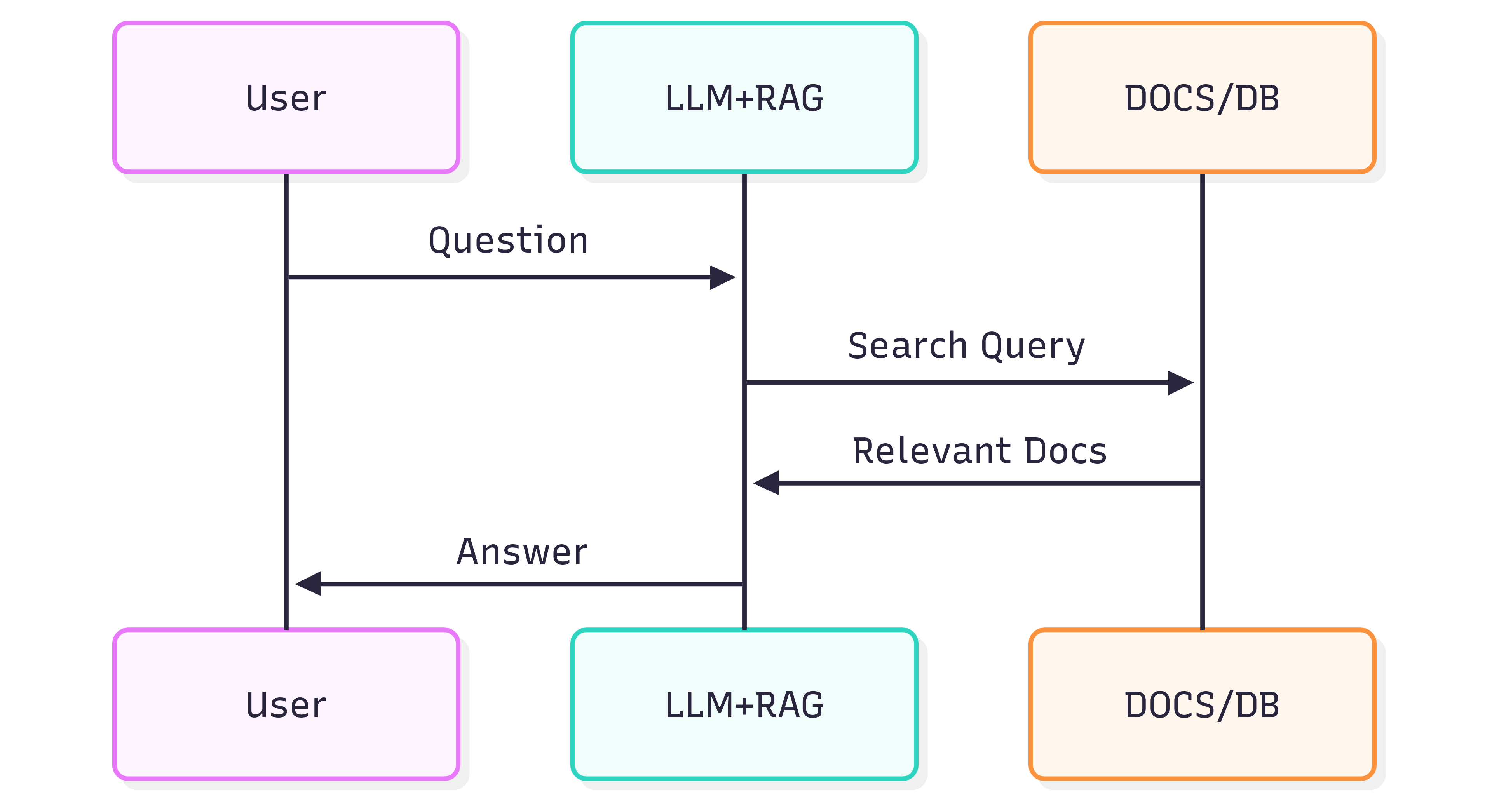
시스템(LLM + RAG)에서 얻는 답변의 품질은 시스템 자체와 소스 문서가 검색 파이프라인에 투입될 때 구조와 의미를 얼마나 잘 보존하느냐에 달려 있습니다.
문제점
문서 포맷은 단순히 시각적인 것이 아니라 의미를 담고 있습니다. 제목, 목록, 표, 굵게/기울임 강조, 캡션, 인라인 이미지 등은 모두 LLM이 컨텍스트를 이해하는 데 도움이 되는 의미를 전달합니다. 페이지를 평면 이미지로 취급하는 OCR과 같이 문서를 무분별하게 변환하면 이러한 의미가 손실됩니다. 그 결과 RAG 검색 및 하위 LLM 답변이 부정확하거나 잡음이 섞일 수 있습니다.
OCR은 스캔된 문서에 도움이 될 수 있지만, 종종 구조를 제거합니다(페이지를 가로지르는 목록, 잘못 해석된 표 경계, 손실된 주석 등). 또한 대용량 아카이브를 처리할 때 비용과 인프라 오버헤드가 추가됩니다.
해결책
대안적인 접근 방식은 구조를 인식하면서 문서를 파싱하고, 그 구조를 의미론적이며 LLM 친화적인 포맷인 Markdown으로 내보내는 것입니다. Markdown은 가볍고 널리 지원되며, 제목, 목록, 표, 코드 블록, 강조, 캡션, 이미지 참조 등을 보존합니다—즉, 검색 품질을 향상시키는 바로 그 기능들입니다.
GroupDocs.Markdown for .NET 은 인기 있는 문서 형식(PDF, DOCX, XLSX, ePub 등)을 깔끔하고 의미론적인 Markdown으로 변환하여 RAG 시스템에 쉽게 주입할 수 있게 합니다. 온프레미스 .NET 라이브러리이므로 모든 처리가 내부 환경에서 이루어지며, 외부 서비스, 데이터 유출, 원격 GPU 의존성이 없습니다.
시작하는 방법
GroupDocs.Markdown for .NET 은 NuGet 패키지로 제공되며, MSI 및 ZIP 다운로드도 가능합니다.
.NET CLI 로 NuGet 패키지를 설치합니다:
dotnet add package GroupDocs.Markdown
또는 공식 다운로드 페이지에서 설치 프로그램 및 어셈블리를 다운로드합니다: https://releases.groupdocs.com/markdown/net/
예제 사용법(Program.cs에 추가):
// 네임스페이스 가져오기
using GroupDocs.Markdown;

// 라이선스 설정(평가용은 선택 사항)
License.Set("GroupDocs.Markdown.lic");

// 소스 문서에 대한 변환기 인스턴스 생성
var converter = new MarkdownConverter("rich-text-formatting.docx");

// 변환하고 결과를 파일에 저장
converter.Convert("rich-text-formatting.md");
변환된 rich-text-formatting.md 파일은 애플리케이션과 동일한 폴더에 저장됩니다.
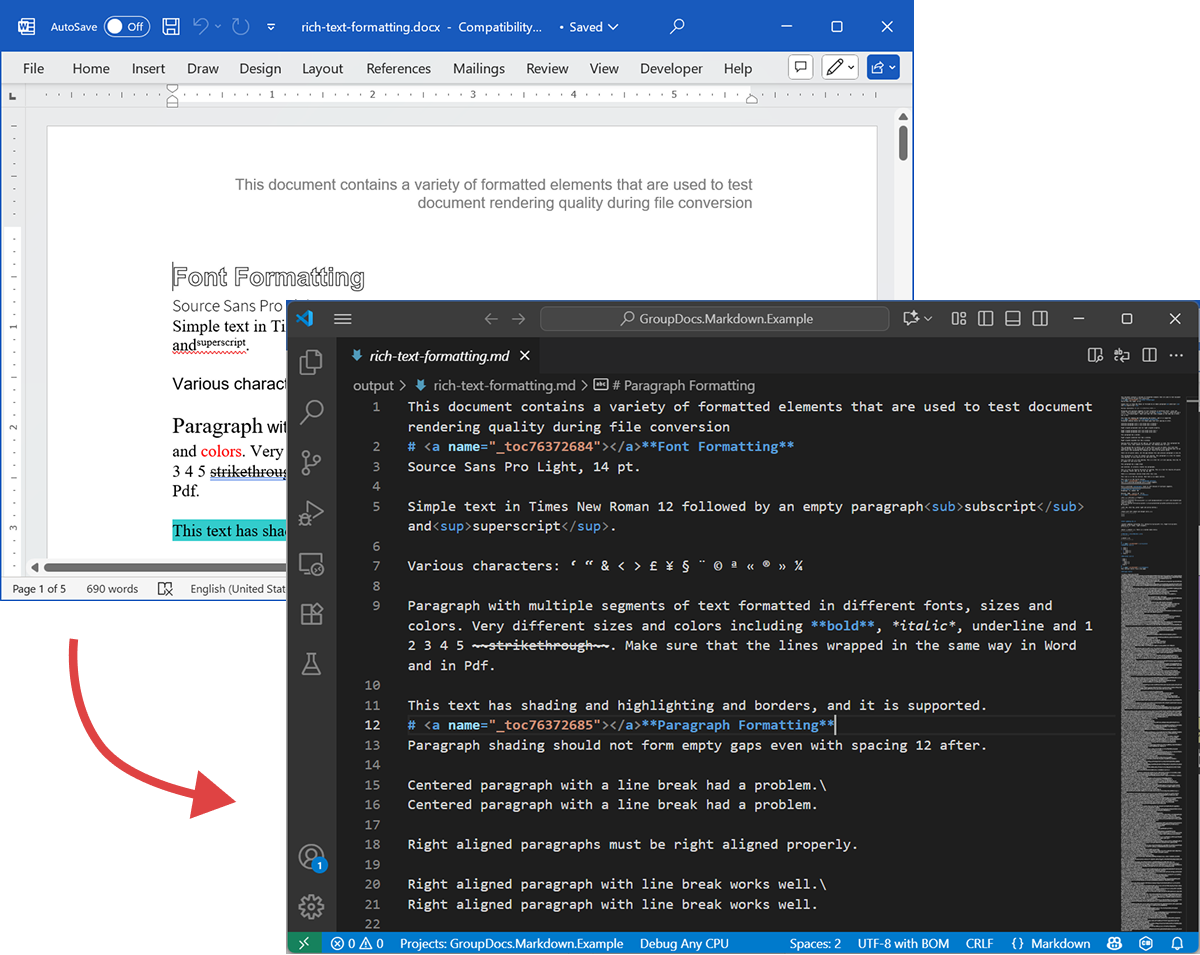
다음 스크린샷은 입력 DOCX 파일과 출력 Markdown을 보여줍니다.
라이선스 없이 실행하면 평가 모드가 제한된 페이지 수(예: 처음 세 페이지)만 처리합니다. 전체 제품을 사용해 보려면 임시 라이선스를 요청하십시오.
임시 라이선스를 요청하려면 Purchase Wizard를 열고 연락처 정보를 입력한 뒤 Contact Details 단계에서 Get a temporary license 를 클릭합니다. 임시 라이선스는 이메일로 전송됩니다.
임시 라이선스에 대한 자세한 내용: https://purchase.groupdocs.com/temporary-license/.
지원되는 파일 형식
GroupDocs.Markdown for .NET 은 광범위한 기업 및 전자책 형식을 지원합니다. 지원되는 확장자 전체 목록:
- PDF
pdf
- 스프레드시트
.xls,.xlsx,.xlsb,.xlsm,.xlt,.xltx,.xltm,.xlam,.csv,.tsv,.ods,.ots,.fods,.numbers,.sxc
- 워드 / 리치 텍스트
.doc,.docx,.dot,.dotm,.dotx,.docm,.rtf,.odt,.ott
- 전자책
.azw3,.mobi,.epub
- 텍스트 / 마크업 / 도움말
.chm,.xml,.txt
작동 원리(내부 – 고수준)
문서가 처리될 때 두 가지 주요 단계가 진행됩니다:
-
문서 모델 추출
문서는 구조적 요소(단락, 제목, 목록, 표, 이미지, 각주, 주석 등)를 나타내는 인메모리 객체 모델로 파싱됩니다. 파서는 의미(예: 목록 중첩, 표 셀, 이미지 캡션)를 보존하려고 노력합니다. -
Markdown 생성
객체 모델을 순회하면서 이미지 처리, 표 포맷, 제목 레벨, 특수 주석 등 변환 옵션에 따라 Markdown 으로 변환합니다. 결과물은 RAG 파이프라인이 인덱싱하기에 적합한 읽기 쉬운 의미론적 Markdown 파일입니다.
내보내기 예시
위 코드 예시는 DOCX 를 Markdown 으로 내보내는 방법을 보여줍니다. 이제 이 코드를 사용해 소스와 출력 파일을 살펴보겠습니다.
소스 DOCX
소스 파일 rich-text-formatting.docx 은 다양한 콘텐츠 블록을 포함하고 있으며, 주요 의미 요소를 강조하도록 강하게 포맷되었습니다.
출력 Markdown
rich-text-formatting.md 의 출력 내용은 아래에 제공되며, 다양한 포맷 요소가 생성된 Markdown 파일에 어떻게 표현되는지 보여줍니다.
This document contains a variety of formatted elements that are used to test document rendering quality during file conversion
# <a name="_toc76372684"></a>**Font Formatting**
Source Sans Pro Light, 14 pt.
Simple text in Times New Roman 12 followed by an empty paragraph<sub>subscript</sub> and<sup>superscript</sup>.
Various characters: ‘ “ & < > £ ¥ § ¨ © ª « ® » ¼
Paragraph with multiple segments of text formatted in different fonts, sizes and colors. Very different sizes and colors including **bold**, *italic*, underline and 1 2 3 4 5 ~~strikethrough~~. Make sure that the lines wrapped in the same way in Word and in Pdf.
This text has shading and highlighting and borders, and it is supported.
# <a name="_toc76372685"></a>**Paragraph Formatting**
Paragraph shading should not form empty gaps even with spacing 12 after.
Centered paragraph with a line break had a problem.\
Centered paragraph with a line break had a problem.
Right aligned paragraphs must be right aligned properly.
Right aligned paragraph with line break works well.\
Right aligned paragraph with line break works well.
This paragraph has a border.
Right aligned condensed text had a problem.
Right aligned expanded text had a problem.
Spacing after and before do not add up, just the greater is used. This paragraph has 12 after. Also, when indents are different, the shading does not join.
This paragraph has 12 before, but in total there is only 12 above. Also note that shading belongs to the paragraph at the top and shading of this paragraph does not go down unless next paragraph has shading too. There are 24 points below.
There are 24 points above, but the gap between this and previous paragraph is only 24.
This paragraph is a test for double line spacing. This paragraph is a test for double line spacing. It also have 0.5” for the first line.
This is a test for 1.5 line spacing. This is a test for 1.5 line spacing. Also has -0.5” indent for the first line.
This paragraph has a page break
and centered. It actually creates two paragraphs.
This is a test for Exactly 20 points of spacing. This is a test for Exactly 20 points of spacing. TTTTTT (20, 22, 24, 26, 28, 30).
There is a continuous section break after this line.
This line is in the new section. Next here is an empty section.
This line is in the fourth section.
# <a name="_toc76372686"></a>**Paragraph Justify**
This is a justified paragraph with a single segment. 111111111111111111111111111111111111111111.
Also a justified **paragraph** reset to left because of multiple segments. 111111111111111111111111111111111111111111.
# **Non-English Characters**
Wingdings: (x, Symbol: WÄ
Russian: Теперь немного по русски.
# <a name="_toc76372687"></a>**Tables**
|Cell 1.1 Left|Cell 1.2 Right|||
| :- | -: | :- | :- |
|Cell 2.1 Centered vertically|Cell 2.2 with background|Cell 2.3 with line break<br>and coloured border.||
|Cell 3.1 Bottom vertically|<p>Cell 3.2</p><p>Centered</p><p>Horizontally</p>|Cell 3.3 No border||
|Left red, blue top, green right and yellow bottom.|
| :- |
|Table with left indent and merged cells.||||
| :- | :- | :- | :- |
|||||
|||||
**Cell padding etc.**
|<p>Cell padding.</p><p>Top: 0.1, bottom 0.2</p><p>Left: 0.5, Right 0.4</p>|Zero padding on all sides, right aligned.|
| :- | -: |
|Outer 1.1|Outer 1.2. There is a nested table here||
| :- | :-: | -: |
|**Nested 1.1**|**Nested 1.2**|
| :- | :- |
|||Outer 1.3|
| :- | :-: | -: |
#
# <a name="_toc76372688"></a>**Lists**
**Numbered list:**
1. Item 1
1. Item 2
1. Item 2.1
1. Item 2.2
1. Item 3
**Bulleted list:**
- Item 1
- Item 2
- Item 2.1
- Item 2.2
- Item 3
#
# <a name="_toc76372689"></a>**Images**
This section starts from a new page.
**Ellipse text**
There is an image in a black border in the top right corner, but it will drop down into the text. There is also a transparent ellipse with text that overlaps the picture.
Inline JPEG in a separate paragraph.

Inline GIF scaled 50% and WMF scaled 25% in a paragraph. This text is before the image and  this text is after the image.
Images in a table. Left and right aligned.
|||
| :- | -: |
Inline text box  is here and inline ellipse  is here.
New section that starts from a new page is here.
It has portrait orientation and margins.
# <a name="_toc76372690"></a>**Fields**
Merge field «FirstName»
Page number 5
Hyperlink [Aspose.com](http://www.aspose.com)
TOC
[Font Formatting 1](#_toc76372684)
[Paragraph Formatting 1](#_toc76372685)
[Non-English Characters 2](#_toc76372686)
[Tables 2](#_toc76372687)
[Lists 2](#_toc76372688)
[Images 4](#_toc76372689)
[Fields 5](#_toc76372690)
# **Form Fields**
Edit <a name="text1"></a>test text
Checkbox <a name="check1"></a>
Combobox <a name="dropdown1"></a>
# **Footnotes and Endnotes**
This line has a footnote at the end.[^1]
This line has an endnote at the end.[^2]
[^1]: Footnote 1.
[^2]: Endnote 1.
요약
GroupDocs.Markdown for .NET 은 다양한 문서 형식을 의미론적 Markdown 으로 변환하여 LLM + RAG 시스템에 바로 사용할 수 있게 합니다. 문서 구조와 의미를 보존하고, 온프레미스에서 실행되며, 일반적인 기업 형식을 지원하므로 대규모 문서 컬렉션을 AI 활용을 위해 준비해야 하는 조직에 실용적인 선택이 됩니다.
자세히 알아보기
- 제품 홈페이지: https://products.groupdocs.com/markdown/net/
- 문서: https://docs.groupdocs.com/markdown/net/
- 라이선스 정보: https://about.groupdocs.com/legal/
- 다운로드: https://releases.groupdocs.com/markdown/net/
지원 및 피드백
질문이나 기술 지원이 필요하면 Free Support Forum 을 이용해 주세요 — 기꺼이 도와드리겠습니다.