Зробіть ваші корпоративні документи готовими до ШІ — надійно, локально та семантично.
Досить часто організації зберігають свою документацію у форматах PDF, DOCX, XLSX та ePub. Хоча великі мовні моделі (LLM) добре працюють з HTML або простим текстом, ці рідні формати документів потребують конвертації, перш ніж їх можна ефективно використовувати в конвеєрах LLM + RAG, де ми хочемо спілкуватися з документом або набором документів.
LLM (Large Language Model) — попередньо навчена модель ШІ, яка генерує текст і відповіді на основі великих корпусів тексту.
RAG (Retrieval‑Augmented Generation) — підхід, який поєднує LLM із зовнішньою базою знань (наприклад, корпоративними документами), щоб модель могла отримувати та розмірковувати над вмістом домену.
Наступна діаграма послідовності ілюструє типові кроки, що беруть участь у формуванні відповіді на запитання:
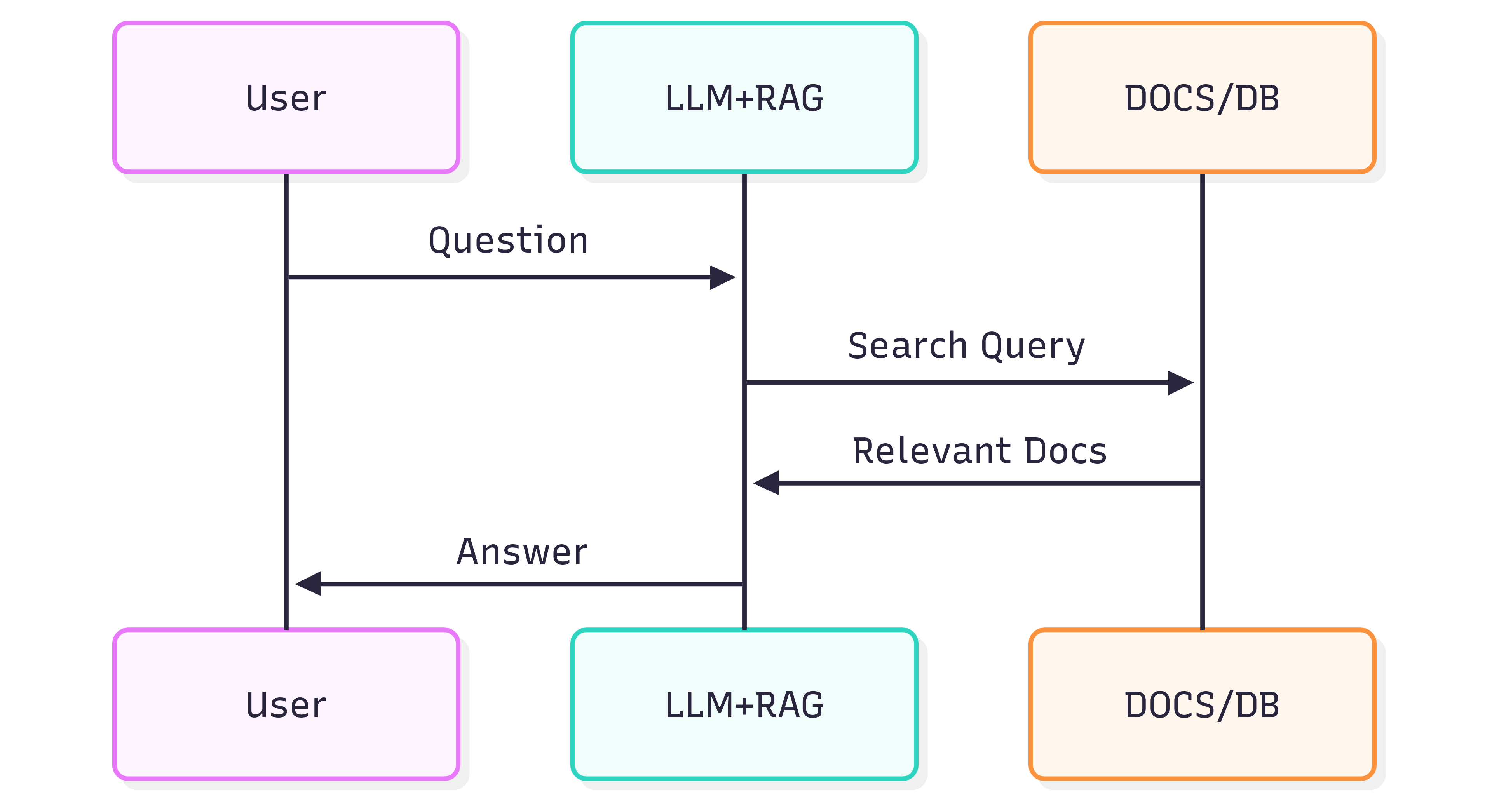
Якість відповідей, які ви отримуєте від системи (LLM + RAG), залежить як від самої системи, так і від того, наскільки добре вихідні документи зберігають свою структуру та зміст під час подачі у конвеєр пошуку.
Проблема
Форматування документів — це не лише візуальне оформлення, а й семантика. Заголовки, списки, таблиці, жирний/курсивний акцент, підписи та вбудовані зображення передають значення, яке допомагає LLM розуміти контекст. Наївна конвертація документів (наприклад, за допомогою OCR, який розглядає кожну сторінку як плоске зображення) часто втрачає цю семантику. У результаті пошук у RAG та подальші відповіді LLM можуть стати неточними або шумними.
OCR може допомогти зі сканованими документами, але часто видаляє структуру (списки, розбиті по сторінках, межі таблиць, неправильно інтерпретовані, втрачені анотації). Крім того, це додає витрати та інфраструктурне навантаження при обробці великих архівів.
Рішення
Альтернативний підхід — парсити документи зі структурною обізнаністю та експортувати цю структуру у семантичний, дружній до LLM формат — Markdown. Markdown легковажний, широко підтримуваний і зберігає заголовки, списки, таблиці, блоки коду, акценти, підписи та посилання на зображення — саме ті функції, які підвищують якість пошуку.
GroupDocs.Markdown for .NET перетворює популярні формати документів (PDF, DOCX, XLSX, ePub та інші) у чистий, семантичний Markdown, придатний для інжекції у RAG‑системи. Це локальна бібліотека .NET, тому вся обробка відбувається у вашому середовищі — без зовнішніх сервісів, без витоку даних і без залежності від віддалених GPU.
Як розпочати
GroupDocs.Markdown for .NET доступний як пакет NuGet, а також у вигляді MSI та ZIP‑завантажень.
Встановіть пакет NuGet за допомогою .NET CLI:
dotnet add package GroupDocs.Markdown
Або завантажте інсталятори та збірки зі сторінки офіційних завантажень: https://releases.groupdocs.com/markdown/net/
Приклад використання (додайте у Program.cs):
// Import the namespace
using GroupDocs.Markdown;

// Set the license (optional for evaluation)
License.Set("GroupDocs.Markdown.lic");

// Instantiate the converter for a source document
var converter = new MarkdownConverter("rich-text-formatting.docx");

// Convert and save output to file
converter.Convert("rich-text-formatting.md");
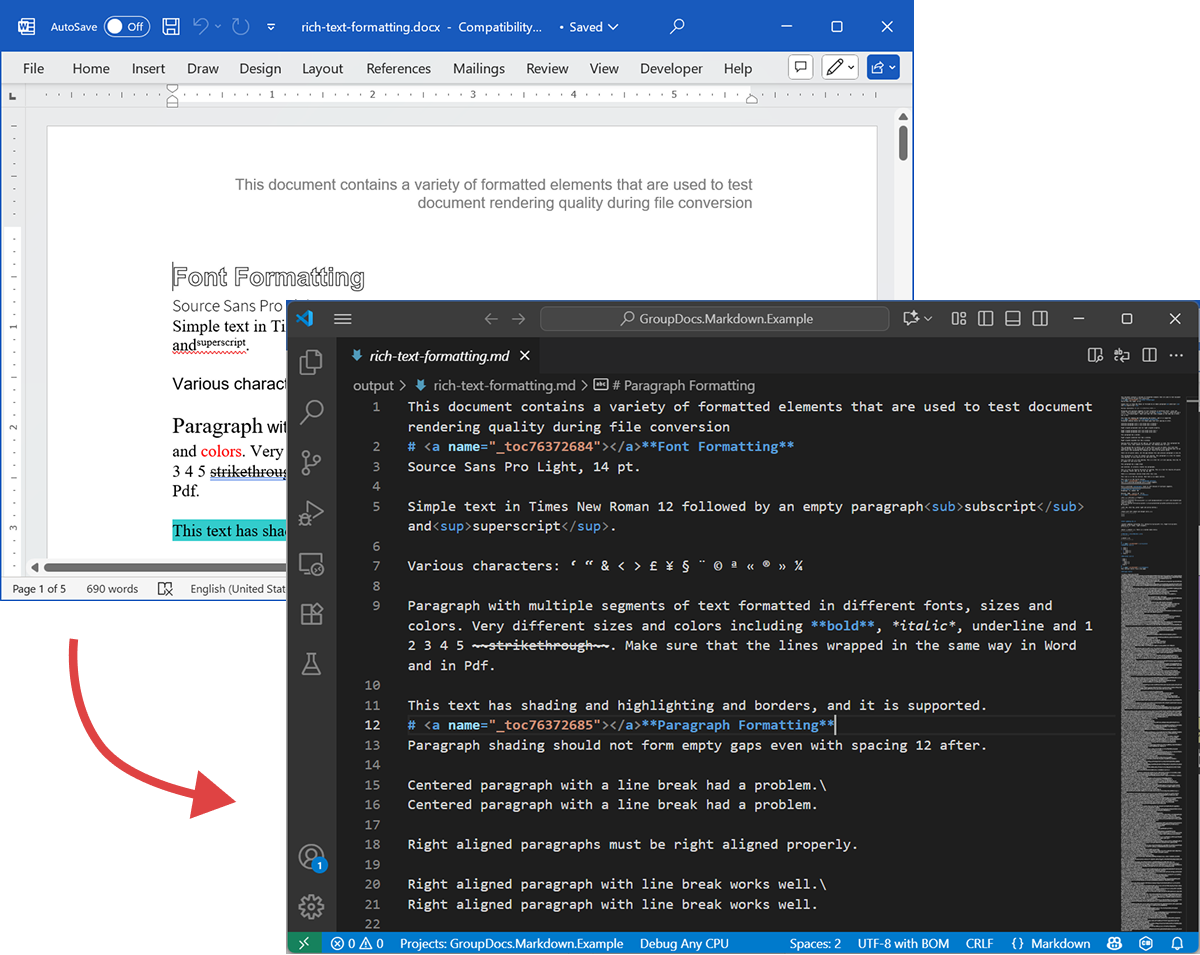
Перетворений файл rich-text-formatting.md буде збережений у тій же папці, що й ваш застосунок.
Наступний скріншот показує вхідний DOCX‑файл та вихідний Markdown.
Якщо запускати без ліцензії, режим оцінки оброблятиме обмежену кількість сторінок (наприклад, перші три). Щоб випробувати повний продукт, запросіть тимчасову ліцензію.
Щоб запросити тимчасову ліцензію, відкрийте Purchase Wizard, вкажіть контактні дані та натисніть Get a temporary license на кроці Contact Details. Тимчасова ліцензія буде надіслана вам електронною поштою.
Детальніше про тимчасові ліцензії: https://purchase.groupdocs.com/temporary-license/.
Підтримувані формати файлів
GroupDocs.Markdown for .NET підтримує широкий набір поширених корпоративних та електронних форматів. Повний список підтримуваних розширень:
- PDF
pdf
- Spreadsheets
.xls,.xlsx,.xlsb,.xlsm,.xlt,.xltx,.xltm,.xlam,.csv,.tsv,.ods,.ots,.fods,.numbers,.sxc
- Word / Rich Text
.doc,.docx,.dot,.dotm,.dotx,.docm,.rtf,.odt,.ott
- Ebooks
.azw3,.mobi,.epub
- Text / Markup / Help
.chm,.xml,.txt
Як це працює (внутрішньо — високий рівень)
Під час обробки документа відбуваються два основних етапи:
-
Витяг моделі документа
Документ парситься у внутрішню об’єктну модель, що представляє структурні елементи (абзаци, заголовки, списки, таблиці, зображення, виноски, анотації тощо). Парсер прагне зберегти семантику (наприклад, вкладеність списків, клітинки таблиці та підписи до зображень). -
Генерація Markdown
Об’єктна модель обходиться і конвертується у Markdown згідно з налаштовуваними параметрами конвертації (як обробляти зображення, форматування таблиць, рівні заголовків, спеціальні анотації тощо). Результат — читабельний, семантично значущий файл Markdown, готовий до індексації вашою RAG‑конвеєрною системою.
Приклад експорту
Кодовий приклад вище показує, як експортувати DOCX у Markdown. Розглянемо цей приклад і подивимося на вихідні файли як демонстрацію.
Вихідний DOCX
Вихідний файл rich-text-formatting.docx містить різноманітні блоки вмісту та сильно відформатований, щоб підкреслити основні семантичні елементи.
Вихідний Markdown
Вміст файлу rich-text-formatting.md наведено нижче, показуючи, як різні елементи форматування представлені у згенерованому Markdown‑файлі.
This document contains a variety of formatted elements that are used to test document rendering quality during file conversion
# <a name="_toc76372684"></a>**Font Formatting**
Source Sans Pro Light, 14 pt.
Simple text in Times New Roman 12 followed by an empty paragraph<sub>subscript</sub> and<sup>superscript</sup>.
Various characters: ‘ “ & < > £ ¥ § ¨ © ª « ® » ¼
Paragraph with multiple segments of text formatted in different fonts, sizes and colors. Very different sizes and colors including **bold**, *italic*, underline and 1 2 3 4 5 ~~strikethrough~~. Make sure that the lines wrapped in the same way in Word and in Pdf.
This text has shading and highlighting and borders, and it is supported.
# <a name="_toc76372685"></a>**Paragraph Formatting**
Paragraph shading should not form empty gaps even with spacing 12 after.
Centered paragraph with a line break had a problem.\
Centered paragraph with a line break had a problem.
Right aligned paragraphs must be right aligned properly.
Right aligned paragraph with line break works well.\
Right aligned paragraph with line break works well.
This paragraph has a border.
Right aligned condensed text had a problem.
Right aligned expanded text had a problem.
Spacing after and before do not add up, just the greater is used. This paragraph has 12 after. Also, when indents are different, the shading does not join.
This paragraph has 12 before, but in total there is only 12 above. Also note that shading belongs to the paragraph at the top and shading of this paragraph does not go down unless next paragraph has shading too. There are 24 points below.
There are 24 points above, but the gap between this and previous paragraph is only 24.
This paragraph is a test for double line spacing. This paragraph is a test for double line spacing. It also have 0.5” for the first line.
This is a test for 1.5 line spacing. This is a test for 1.5 line spacing. Also has -0.5” indent for the first line.
This paragraph has a page break
and centered. It actually creates two paragraphs.
This is a test for Exactly 20 points of spacing. This is a test for Exactly 20 points of spacing. TTTTTT (20, 22, 24, 26, 28, 30).
There is a continuous section break after this line.
This line is in the new section. Next here is an empty section.
This line is in the fourth section.
# <a name="_toc76372686"></a>**Paragraph Justify**
This is a justified paragraph with a single segment. 111111111111111111111111111111111111111111.
Also a justified **paragraph** reset to left because of multiple segments. 111111111111111111111111111111111111111111.
# **Non-English Characters**
Wingdings: (x, Symbol: WÄ
Russian: Теперь немного по русски.
# <a name="_toc76372687"></a>**Tables**
|Cell 1.1 Left|Cell 1.2 Right|||
| :- | -: | :- | :- |
|Cell 2.1 Centered vertically|Cell 2.2 with background|Cell 2.3 with line break<br>and coloured border.||
|Cell 3.1 Bottom vertically|<p>Cell 3.2</p><p>Centered</p><p>Horizontally</p>|Cell 3.3 No border||
|Left red, blue top, green right and yellow bottom.|
| :- |
|Table with left indent and merged cells.||||
| :- | :- | :- | :- |
|||||
|||||
**Cell padding etc.**
|<p>Cell padding.</p><p>Top: 0.1, bottom 0.2</p><p>Left: 0.5, Right 0.4</p>|Zero padding on all sides, right aligned.|
| :- | -: |
|Outer 1.1|Outer 1.2. There is a nested table here||
| :- | :-: | -: |
|**Nested 1.1**|**Nested 1.2**|
| :- | :- |
|||Outer 1.3|
| :- | :-: | -: |
#
# <a name="_toc76372688"></a>**Lists**
**Numbered list:**
1. Item 1
1. Item 2
1. Item 2.1
1. Item 2.2
1. Item 3
**Bulleted list:**
- Item 1
- Item 2
- Item 2.1
- Item 2.2
- Item 3
#
# <a name="_toc76372689"></a>**Images**
This section starts from a new page.
**Ellipse text**
There is an image in a black border in the top right corner, but it will drop down into the text. There is also a transparent ellipse with text that overlaps the picture.
Inline JPEG in a separate paragraph.

Inline GIF scaled 50% and WMF scaled 25% in a paragraph. This text is before the image and  this text is after the image.
Images in a table. Left and right aligned.
|||
| :- | -: |
Inline text box  is here and inline ellipse  is here.
New section that starts from a new page is here.
It has portrait orientation and margins.
# <a name="_toc76372690"></a>**Fields**
Merge field «FirstName»
Page number 5
Hyperlink [Aspose.com](http://www.aspose.com)
TOC
[Font Formatting 1](#_toc76372684)
[Paragraph Formatting 1](#_toc76372685)
[Non-English Characters 2](#_toc76372686)
[Tables 2](#_toc76372687)
[Lists 2](#_toc76372688)
[Images 4](#_toc76372689)
[Fields 5](#_toc76372690)
# **Form Fields**
Edit <a name="text1"></a>test text
Checkbox <a name="check1"></a>
Combobox <a name="dropdown1"></a>
# **Footnotes and Endnotes**
This line has a footnote at the end.[^1]
This line has an endnote at the end.[^2]
[^1]: Footnote 1.
[^2]: Endnote 1.
Підсумок
GroupDocs.Markdown for .NET допомагає конвертувати широкий спектр форматів документів у семантичний Markdown, готовий для систем LLM + RAG. Він зберігає структуру та зміст документів, працює локально та підтримує поширені корпоративні формати — що робить його практичним вибором для організацій, які потребують підготовки великих колекцій документів для споживання ШІ.
Дізнатись більше
- Домашня сторінка продукту: https://products.groupdocs.com/markdown/net/
- Документація: https://docs.groupdocs.com/markdown/net/
- Інформація про ліцензії: https://about.groupdocs.com/legal/
- Завантаження: https://releases.groupdocs.com/markdown/net/
Підтримка та зворотний зв’язок
Для запитань або технічної допомоги, будь ласка, використовуйте наш Free Support Forum — ми будемо раді допомогти.