让您的企业文档具备 AI 能力 — 可靠、本地部署、语义化。
在企业中,文档通常以 PDF、DOCX、XLSX 和 ePub 等格式保存。虽然 LLM(大语言模型)在 HTML 或纯文本上表现良好,但这些原生文档格式在用于 LLM + RAG 流程(例如与单个文档或文档集合进行对话)之前,需要先进行转换。
LLM(Large Language Model) — 通过大规模文本语料库预训练的 AI 模型,可生成文本并给出答案。
RAG(Retrieval‑Augmented Generation) — 将 LLM 与外部知识库(例如企业文档)结合的方式,使模型能够检索并推理领域内容。
下图展示了生成问题答案的典型步骤:
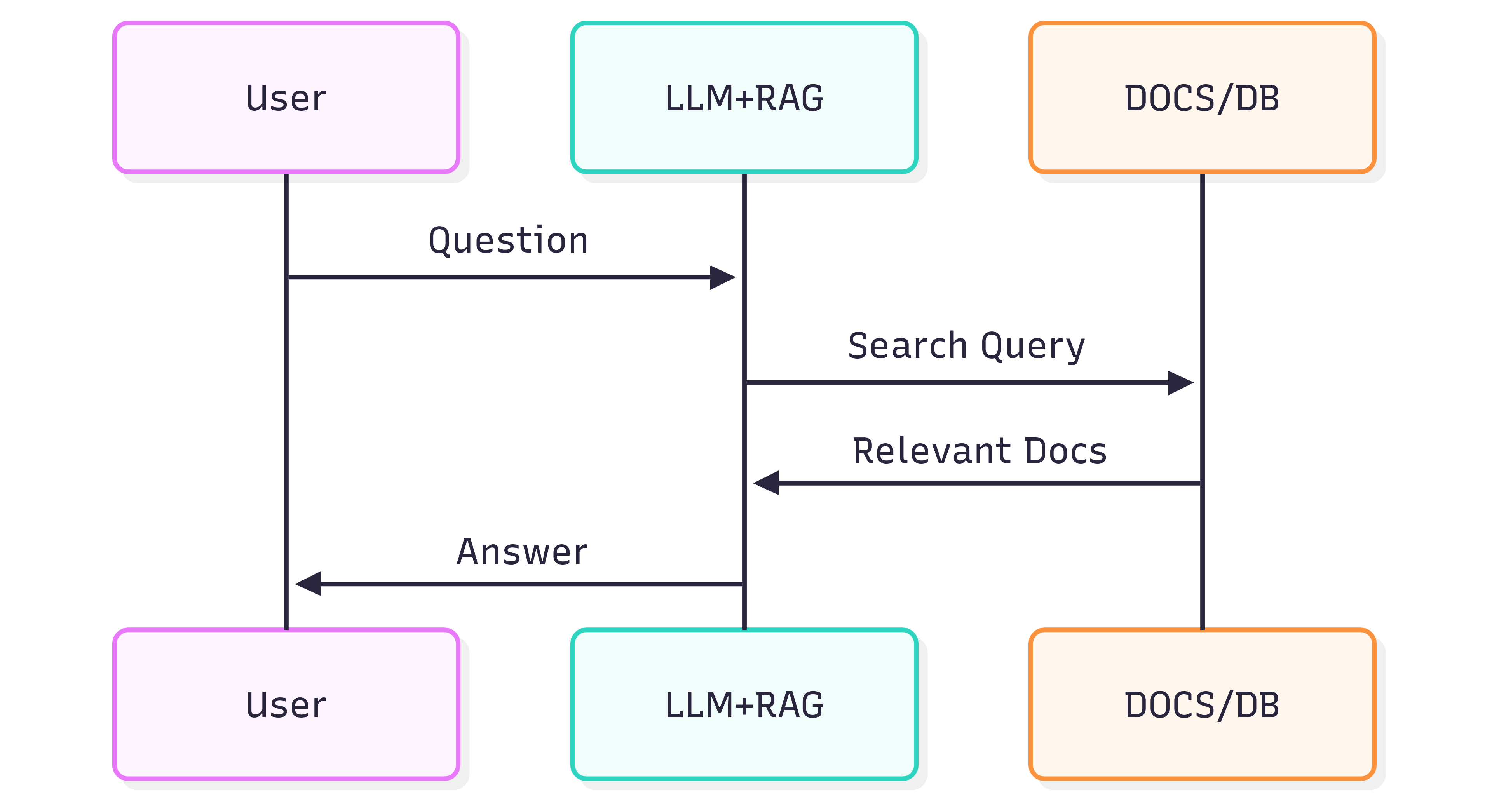
系统(LLM + RAG)给出的答案质量,既取决于系统本身,也取决于源文档在进入检索管道时保持结构和含义的程度。
问题
文档格式不仅是视觉呈现——它还承载语义。标题、列表、表格、粗体/斜体强调、图注以及内嵌图片都传递了帮助 LLM 理解上下文的信息。若仅使用 OCR 等将每页视为平面图像的方式进行粗糙转换,往往会丢失这些语义,导致 RAG 检索和下游 LLM 的答案出现不准确或噪声。
OCR 能处理扫描文档,但常常会破坏结构(跨页列表、表格边框误判、注释丢失)。同时,在处理大规模档案时也会增加成本和基础设施负担。
解决方案
另一种思路是使用具备结构感知的解析方式,将文档结构导出为语义化、适配 LLM 的格式 —— Markdown。Markdown 轻量、兼容性强,能够保留标题、列表、表格、代码块、强调、图注和图片引用等特性,这些正是提升检索质量的关键要素。
GroupDocs.Markdown for .NET 能将常见文档格式(PDF、DOCX、XLSX、ePub 等)转换为干净、语义化的 Markdown,适用于 RAG 系统的导入。它是本地部署的 .NET 库,所有处理均在您的环境中完成——无需外部服务、无数据泄露,也不依赖远程 GPU。
入门指南
GroupDocs.Markdown for .NET 以 NuGet 包形式提供,也可下载 MSI 与 ZIP 安装包。
使用 .NET CLI 安装 NuGet 包:
dotnet add package GroupDocs.Markdown
或从官方下载页面获取安装程序和程序集:https://releases.groupdocs.com/markdown/net/
示例用法(添加到 Program.cs):
// Import the namespace
using GroupDocs.Markdown;

// Set the license (optional for evaluation)
License.Set("GroupDocs.Markdown.lic");

// Instantiate the converter for a source document
var converter = new MarkdownConverter("rich-text-formatting.docx");

// Convert and save output to file
converter.Convert("rich-text-formatting.md");
转换后的 rich-text-formatting.md 文件将保存在与应用程序相同的文件夹中。
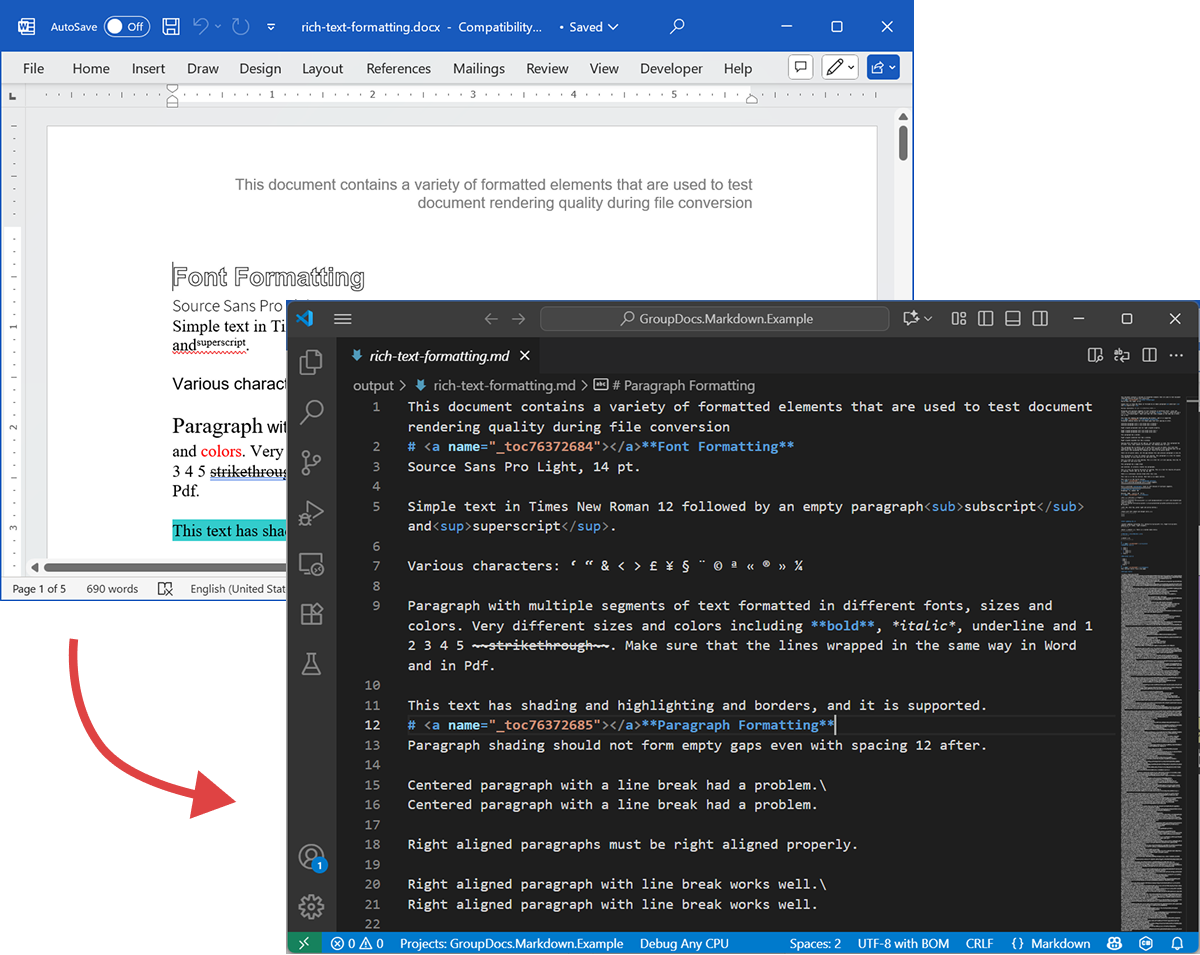
下面的截图展示了输入的 DOCX 文件和输出的 Markdown。
若在未提供许可证的情况下运行,评估模式仅处理有限页数(例如前三页)。如需完整功能,请申请临时许可证。
要申请临时许可证,请打开 Purchase Wizard,填写联系信息,并在 Contact Details 步骤中点击 获取临时许可证。临时许可证将通过电子邮件发送给您。
了解临时许可证的更多信息:https://purchase.groupdocs.com/temporary-license/。
支持的文件格式
GroupDocs.Markdown for .NET 支持广泛的企业和电子书常用格式。完整的扩展名列表如下:
- PDF
pdf
- 电子表格
.xls,.xlsx,.xlsb,.xlsm,.xlt,.xltx,.xltm,.xlam,.csv,.tsv,.ods,.ots,.fods,.numbers,.sxc
- Word / 富文本
.doc,.docx,.dot,.dotm,.dotx,.docm,.rtf,.odt,.ott
- 电子书
.azw3,.mobi,.epub
- 文本 / 标记 / 帮助
.chm,.xml,.txt
工作原理(内部实现 — 高层)
文档处理分为两个主要阶段:
-
文档模型提取
将文档解析为内存中的对象模型,模型包含结构化元素(段落、标题、列表、表格、图片、脚注、注释等)。解析器尽可能保留语义(例如列表嵌套、表格单元格、图片图注)。 -
Markdown 生成
遍历对象模型并依据可配置的转换选项(如何处理图片、表格格式、标题层级、特殊注释等)生成 Markdown。最终得到的 Markdown 文件可读、语义明确,适合您的 RAG 流程进行索引。
导出示例
上面的代码示例演示了如何将 DOCX 导出为 Markdown。下面我们通过该示例查看源文件和输出文件的实际效果。
源 DOCX
源文件 rich-text-formatting.docx 包含多种内容块,并通过大量格式化突出主要语义元素。
输出 Markdown
以下是 rich-text-formatting.md 的输出内容,展示了不同格式元素在生成的 Markdown 文件中的表现。
This document contains a variety of formatted elements that are used to test document rendering quality during file conversion
# <a name="_toc76372684"></a>**Font Formatting**
Source Sans Pro Light, 14 pt.
Simple text in Times New Roman 12 followed by an empty paragraph<sub>subscript</sub> and<sup>superscript</sup>.
Various characters: ‘ “ & < > £ ¥ § ¨ © ª « ® » ¼
Paragraph with multiple segments of text formatted in different fonts, sizes and colors. Very different sizes and colors including **bold**, *italic*, underline and 1 2 3 4 5 ~~strikethrough~~. Make sure that the lines wrapped in the same way in Word and in Pdf.
This text has shading and highlighting and borders, and it is supported.
# <a name="_toc76372685"></a>**Paragraph Formatting**
Paragraph shading should not form empty gaps even with spacing 12 after.
Centered paragraph with a line break had a problem.\
Centered paragraph with a line break had a problem.
Right aligned paragraphs must be right aligned properly.
Right aligned paragraph with line break works well.\
Right aligned paragraph with line break works well.
This paragraph has a border.
Right aligned condensed text had a problem.
Right aligned expanded text had a problem.
Spacing after and before do not add up, just the greater is used. This paragraph has 12 after. Also, when indents are different, the shading does not join.
This paragraph has 12 before, but in total there is only 12 above. Also note that shading belongs to the paragraph at the top and shading of this paragraph does not go down unless next paragraph has shading too. There are 24 points below.
There are 24 points above, but the gap between this and previous paragraph is only 24.
This paragraph is a test for double line spacing. This paragraph is a test for double line spacing. It also have 0.5” for the first line.
This is a test for 1.5 line spacing. This is a test for 1.5 line spacing. Also has -0.5” indent for the first line.
This paragraph has a page break
and centered. It actually creates two paragraphs.
This is a test for Exactly 20 points of spacing. This is a test for Exactly 20 points of spacing. TTTTTT (20, 22, 24, 26, 28, 30).
There is a continuous section break after this line.
This line is in the new section. Next here is an empty section.
This line is in the fourth section.
# <a name="_toc76372686"></a>**Paragraph Justify**
This is a justified paragraph with a single segment. 111111111111111111111111111111111111111111.
Also a justified **paragraph** reset to left because of multiple segments. 111111111111111111111111111111111111111111.
# **Non-English Characters**
Wingdings: (x, Symbol: WÄ
Russian: Теперь немного по русски.
# <a name="_toc76372687"></a>**Tables**
|Cell 1.1 Left|Cell 1.2 Right|||
| :- | -: | :- | :- |
|Cell 2.1 Centered vertically|Cell 2.2 with background|Cell 2.3 with line break<br>and coloured border.||
|Cell 3.1 Bottom vertically|<p>Cell 3.2</p><p>Centered</p><p>Horizontally</p>|Cell 3.3 No border||
|Left red, blue top, green right and yellow bottom.|
| :- |
|Table with left indent and merged cells.||||
| :- | :- | :- | :- |
|||||
|||||
**Cell padding etc.**
|<p>Cell padding.</p><p>Top: 0.1, bottom 0.2</p><p>Left: 0.5, Right 0.4</p>|Zero padding on all sides, right aligned.|
| :- | -: |
|Outer 1.1|Outer 1.2. There is a nested table here||
| :- | :-: | -: |
|**Nested 1.1**|**Nested 1.2**|
| :- | :- |
|||Outer 1.3|
| :- | :-: | -: |
#
# <a name="_toc76372688"></a>**Lists**
**Numbered list:**
1. Item 1
1. Item 2
1. Item 2.1
1. Item 2.2
1. Item 3
**Bulleted list:**
- Item 1
- Item 2
- Item 2.1
- Item 2.2
- Item 3
#
# <a name="_toc76372689"></a>**Images**
This section starts from a new page.
**Ellipse text**
There is an image in a black border in the top right corner, but it will drop down into the text. There is also a transparent ellipse with text that overlaps the picture.
Inline JPEG in a separate paragraph.

Inline GIF scaled 50% and WMF scaled 25% in a paragraph. This text is before the image and  this text is after the image.
Images in a table. Left and right aligned.
|||
| :- | -: |
Inline text box  is here and inline ellipse  is here.
New section that starts from a new page is here.
It has portrait orientation and margins.
# <a name="_toc76372690"></a>**Fields**
Merge field «FirstName»
Page number 5
Hyperlink [Aspose.com](http://www.aspose.com)
TOC
[Font Formatting 1](#_toc76372684)
[Paragraph Formatting 1](#_toc76372685)
[Non-English Characters 2](#_toc76372686)
[Tables 2](#_toc76372687)
[Lists 2](#_toc76372688)
[Images 4](#_toc76372689)
[Fields 5](#_toc76372690)
# **Form Fields**
Edit <a name="text1"></a>test text
Checkbox <a name="check1"></a>
Combobox <a name="dropdown1"></a>
# **Footnotes and Endnotes**
This line has a footnote at the end.[^1]
This line has an endnote at the end.[^2]
[^1]: Footnote 1.
[^2]: Endnote 1.
总结
GroupDocs.Markdown for .NET 帮助您将多种文档格式转换为语义化的 Markdown,便于 LLM + RAG 系统使用。它能够保留文档结构和含义,支持本地部署,并兼容常见企业格式,是企业准备大规模文档集合供 AI 使用的实用方案。
了解更多
- 产品主页:https://products.groupdocs.com/markdown/net/
- 文档中心:https://docs.groupdocs.com/markdown/net/
- 许可证信息:https://about.groupdocs.com/legal/
- 下载页面:https://releases.groupdocs.com/markdown/net/
支持与反馈
如有疑问或需要技术帮助,请访问我们的 Free Support Forum —— 我们乐意为您提供帮助。