We’re excited to introduce GroupDocs.Markdown for .NET, a new addition to the GroupDocs product family. GroupDocs.Markdown for .NET is a document processing API that enables you to export PDF, Word, Excel, and other formats to Markdown for seamless integration with the generative AI ecosystem.
私たちは、GroupDocs製品ファミリーに新たに加わったGroupDocs.Markdown for .NET をご紹介できることを嬉しく思います。GroupDocs.Markdown for .NET は、PDF、Word、Excel、その他の形式をMarkdownにエクスポートし、生成AIエコシステムとシームレスに統合できるドキュメント処理APIです。
Why Markdown?
なぜMarkdownなのか?
Markdown is lightweight, human-readable, and widely supported in developer workflows, content management systems, and generative AI pipelines. With direct export to Markdown, GroupDocs.Markdown for .NET helps you:
Markdownは軽量で人間が読みやすく、開発者のワークフロー、コンテンツ管理システム、生成AIパイプラインで広くサポートされています。Markdownへの直接エクスポートにより、GroupDocs.Markdown for .NET は以下を支援します:
- Automate document-to-Markdown conversions inside .NET applications.
.NETアプリケーション内でドキュメントからMarkdownへの変換を自動化します。 - Prepare structured, plain-text content suitable for AI processing.
AI処理に適した構造化されたプレーンテキストコンテンツを作成します。 - Simplify content migration to Git-based workflows and static site generators.
Gitベースのワークフローや静的サイトジェネレーターへのコンテンツ移行を簡素化します。
Features
機能
- Export multiple document formats: Convert popular file types (PDF, DOCX, XLSX, EPUB, and more) to Markdown.
複数のドキュメント形式をエクスポート: 人気のあるファイルタイプ(PDF、DOCX、XLSX、EPUB など)をMarkdownに変換します。 - Advanced Markdown formatting: Accurately export headings, paragraphs, lists, tables, links, images, blockquotes, and code blocks.
高度なMarkdownフォーマット: 見出し、段落、リスト、テーブル、リンク、画像、ブロック引用、コードブロックを正確にエクスポートします。 - Flexible image handling: Export images separately or embed them directly into the Markdown file.
柔軟な画像処理: 画像を別ファイルとしてエクスポートするか、Markdownファイルに直接埋め込むことができます。 - Local processing: No cloud or internet connection required. All processing happens securely on your machine.
ローカル処理: クラウドやインターネット接続は不要です。すべての処理はローカルマシンで安全に行われます。 - Intuitive API design: Simple, developer-friendly API created with ease of use in mind.
直感的なAPI設計: 使いやすさを念頭に置いたシンプルで開発者フレンドリーなAPIです。 - Cross-platform support: Works on Windows and Linux with both .NET and .NET Framework assemblies included in the NuGet package.
クロスプラットフォーム対応: Windows と Linux の両方で動作し、.NET と .NET Framework のアセンブリが NuGet パッケージに含まれています。
Supported File Types
サポートされているファイルタイプ
GroupDocs.Markdown supports conversion from the following formats:
GroupDocs.Markdown は以下の形式からの変換をサポートしています:
- PDF Documents
PDFドキュメント - Microsoft Word (DOCX, DOC)
Microsoft Word(DOCX、DOC) - Microsoft Excel (XLSX, XLS)
Microsoft Excel(XLSX、XLS) - Ebooks (EPUB, MOBI)
電子書籍(EPUB、MOBI) - Plain Text and Web files
プレーンテキストおよびウェブファイル
Usage
使用方法
Common scenarios for exporting documents to Markdown.
ドキュメントをMarkdownにエクスポートする一般的なシナリオです。
Export PDF to Markdown
PDFをMarkdownにエクスポート
Convert a PDF into clean Markdown in just a few lines of code. By default, images are embedded in the output file.
数行のコードでPDFをクリーンなMarkdownに変換します。デフォルトでは、画像は出力ファイルに埋め込まれます。
// Import the namespace
using GroupDocs.Markdown;
// Set the license (optional)
License.Set("GroupDocs.Markdown.lic");
// Instantiate the converter
var converter = new MarkdownConverter("business-plan.pdf");
// Convert and save output to file
converter.Convert("business-plan.md");
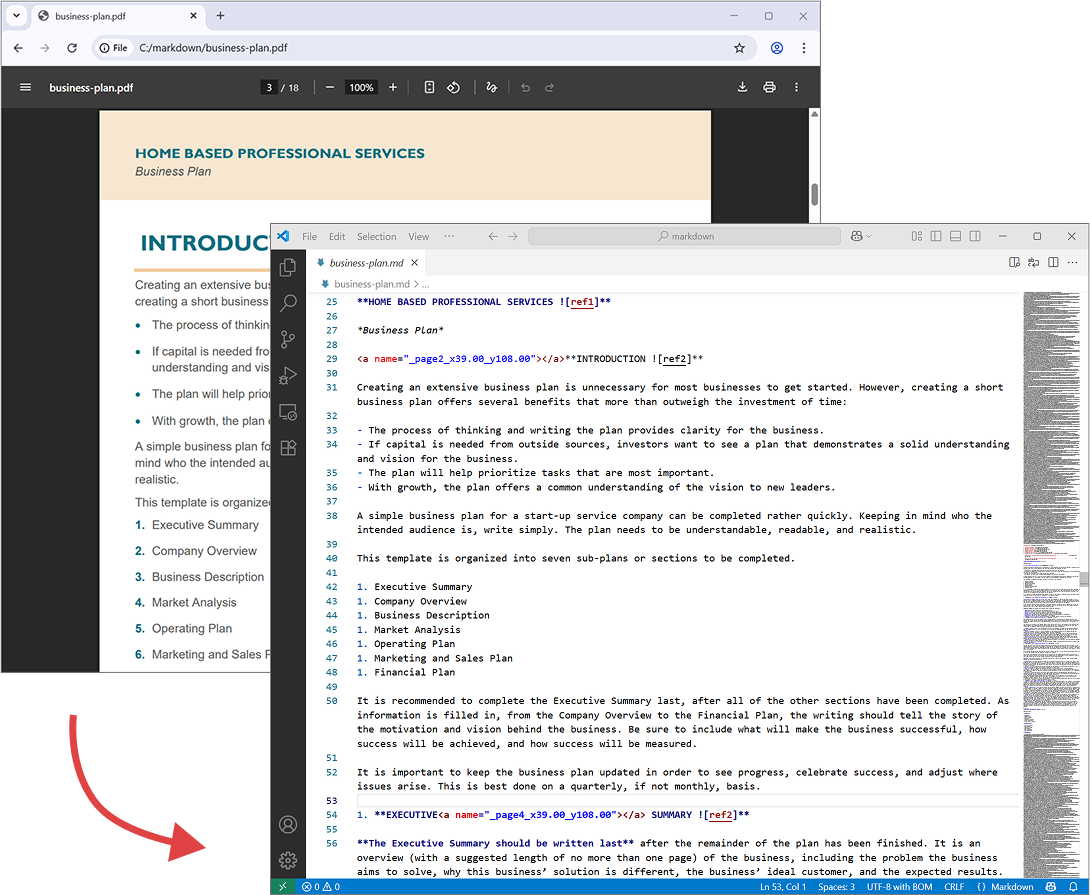
The following screenshot shows input PDF file and output Markdown.
以下のスクリーンショットは、入力PDFファイルと出力されたMarkdownを示しています。
Save images to a folder
画像をフォルダーに保存
This example shows how to convert a DOCX file to Markdown while saving images to a separate folder.
この例は、DOCXファイルをMarkdownに変換しながら、画像を別フォルダーに保存する方法を示しています。
// Import the namespace
using GroupDocs.Markdown;
// Set the license (optional)
License.Set("GroupDocs.Markdown.lic");
// Instantiate the converter
var converter = new MarkdownConverter("annual-review.docx");
// Set image export strategy and output folder
var convertOptions = new DocumentConverterOptions();
convertOptions.ImageExportStrategy = new ExportImagesToFileSystemStrategy("./images");
// Convert and save output to file
converter.Convert("annual-review.md");
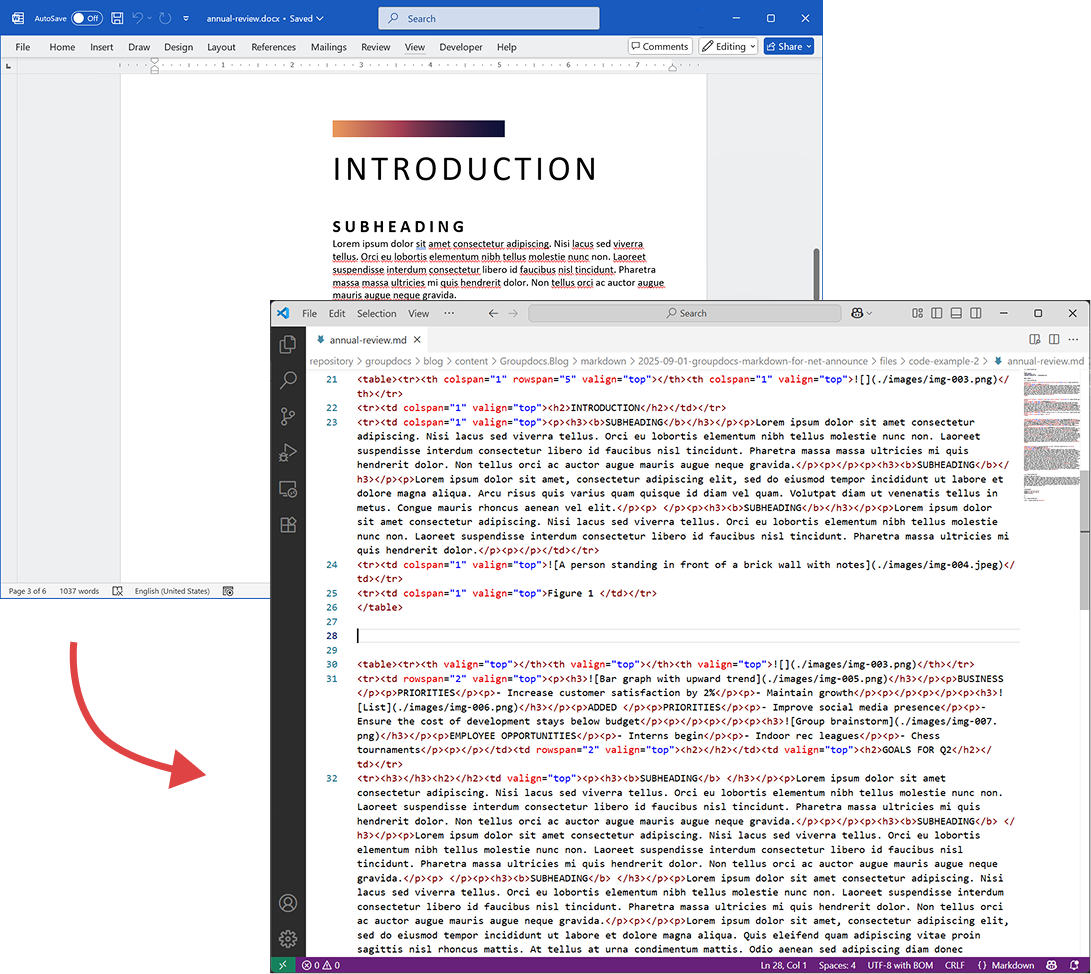
The following screenshot shows input DOCX file and output Markdown. The images are saved as a separate external resources in the ./images folder.
以下のスクリーンショットは、入力DOCXファイルと出力されたMarkdownを示しています。画像は ./images フォルダーに外部リソースとして別々に保存されます。
Requirements
必要条件
- .NET Framework 4.6.2+ (Windows)
.NET Framework 4.6.2以上(Windows) - .NET 6.0+ (Windows or Linux)
.NET 6.0以上(Windows または Linux)
License
ライセンス
See detailed legal information, including terms of use, copyright, EULA, and privacy policy:
利用規約、著作権、エンドユーザー使用許諾契約(EULA)、プライバシーポリシーなど、詳細な法的情報をご覧ください:
https://about.groupdocs.com/legal/
Support
サポート
For questions or technical assistance, please use our Free Support Forum.
質問や技術的な支援が必要な場合は、Free Support Forumをご利用ください。
Roadmap & Availability
ロードマップと提供時期
The very first version of our package is already built and going through internal testing, including unit, integration, and manual API checks. We’re making sure everything works smoothly so you can enjoy a reliable and powerful experience right from day one.
パッケージの最初のバージョンはすでに構築されており、ユニットテスト、統合テスト、手動のAPIチェックを含む内部テストを実施中です。すべてがスムーズに動作することを確認し、初日から信頼性が高く強力な体験をご提供できるようにしています。
🚀 Once the final reviews are complete, we’ll release the package on NuGet and the GroupDocs Releases website.
🚀 最終レビューが完了次第、NuGet と GroupDocs Releases のウェブサイトでパッケージをリリースします。
👉 Want to be the first to know when it’s live? We’ll post a dedicated announcement here on the blog! In the meantime, you can also subscribe for updates via our Free Support Forum — check out the GroupDocs.Markdown Product Family category or the GroupDocs.Purchase category if you have sales-related questions.
👉 リリースが開始された際にいち早く知りたいですか?ブログに専用のお知らせを掲載します!それまでの間、Free Support Forum で更新情報を購読することもできます。販売に関する質問がある場合は、GroupDocs.Markdown Product Family category または GroupDocs.Purchase category をご確認ください。