企業文書を AI 対応に — 信頼性が高く、オンプレミスで、意味的に整備された形で。
組織が PDF、DOCX、XLSX、ePub 形式で文書を管理しているケースは非常に一般的です。LLM(大規模言語モデル)は HTML やプレーンテキストでうまく機能しますが、これらのネイティブ文書形式は、LLM + RAG パイプラインで文書や文書群と対話したい場合に、効果的に使用できるよう変換が必要です。
LLM(Large Language Model) — 大規模テキストコーパスで事前学習された AI モデルで、テキストや回答を生成します。
RAG(Retrieval‑Augmented Generation) — LLM と外部ナレッジベース(例: 企業文書)を組み合わせ、モデルがドメイン固有のコンテンツを取得・推論できるようにするアプローチ。
以下のシーケンス図は、質問への回答を生成する際の典型的な手順を示しています。
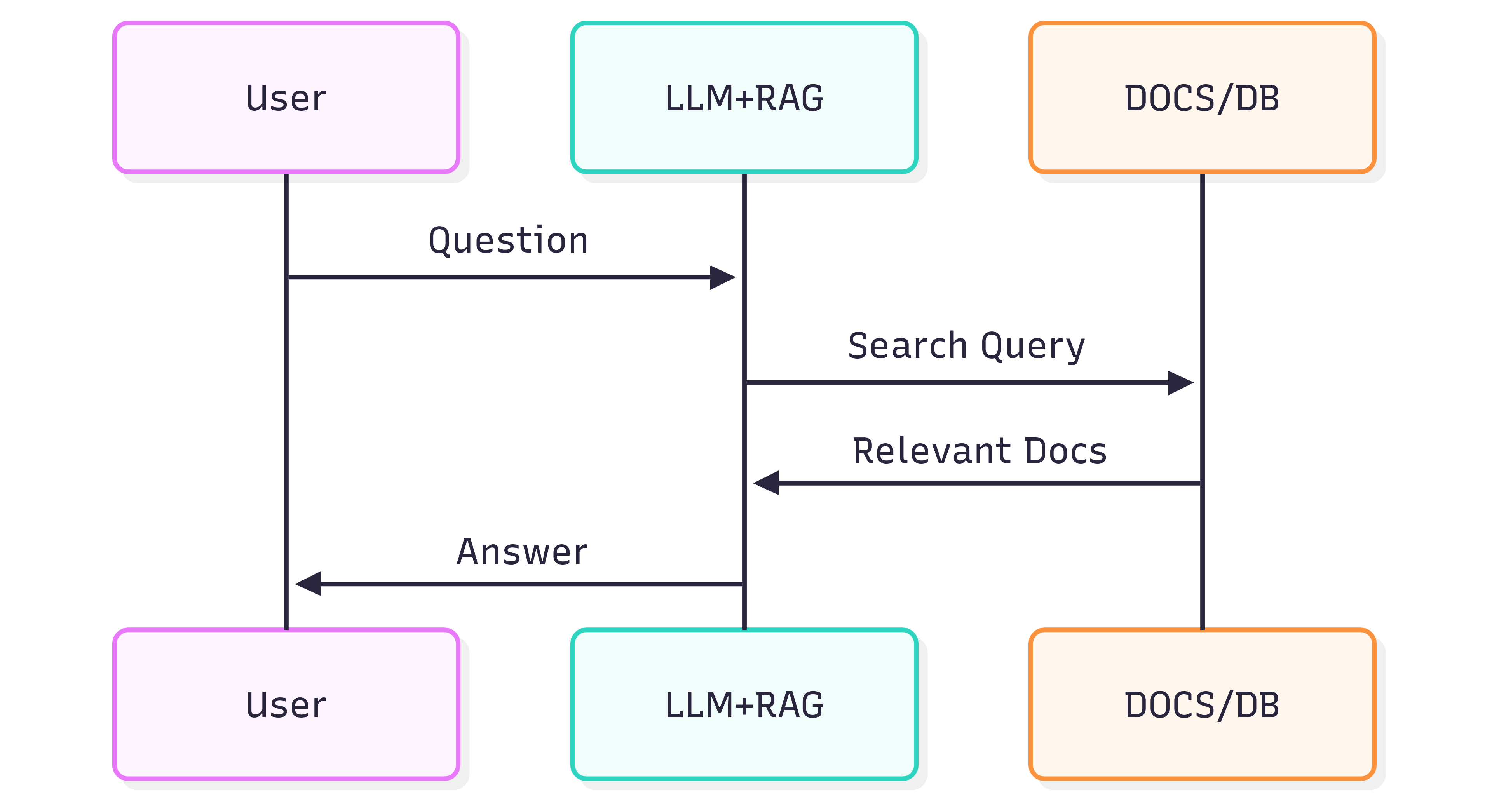
System(LLM + RAG)から得られる回答の品質は、システム自体だけでなく、ソース文書が構造と意味をどれだけ保持した状態で取得パイプラインに供給されるかにも依存します。
問題点
文書のフォーマットは単なる見た目だけでなく、意味も保持しています。見出し、リスト、表、太字/斜体の強調、キャプション、インライン画像はすべて、LLM がコンテキストを理解するための意味情報を提供します。ページ全体を平坦な画像として扱う OCR などで文書を安易に変換すると、これらの意味が失われがちです。その結果、RAG の取得精度や下流の LLM の回答が不正確またはノイズが多くなることがあります。
OCR はスキャン文書に有用ですが、構造(ページを跨ぐリスト、表の罫線の誤認、注釈の喪失)をしばしば失います。また、大量のアーカイブを処理する際にはコストとインフラ負荷が増大します。
解決策
構造を認識したまま文書を解析し、その構造を LLM フレンドリーなセマンティック形式 ― Markdown ― にエクスポートするアプローチです。Markdown は軽量で広くサポートされており、見出し、リスト、表、コードブロック、強調、キャプション、画像参照といった、取得品質を向上させる要素をすべて保持します。
GroupDocs.Markdown for .NET は、PDF、DOCX、XLSX、ePub などの一般的な文書形式を、RAG システムへのインジェストに適したクリーンでセマンティックな Markdown に変換します。オンプレミスの .NET ライブラリであるため、すべての処理が自社環境内で完結し、外部サービスへの依存やデータ漏洩、リモート GPU の利用が不要です。
はじめ方
GroupDocs.Markdown for .NET は NuGet パッケージとして提供されており、MSI と ZIP でもダウンロードできます。
.NET CLI で NuGet パッケージをインストールします。
dotnet add package GroupDocs.Markdown
または公式ダウンロードページからインストーラとアセンブリを取得してください: https://releases.groupdocs.com/markdown/net/
使用例(Program.cs に追加):
// 名前空間をインポート
using GroupDocs.Markdown;

// ライセンスを設定(評価版はオプション)
License.Set("GroupDocs.Markdown.lic");

// ソース文書用コンバータをインスタンス化
var converter = new MarkdownConverter("rich-text-formatting.docx");

// 変換してファイルに保存
converter.Convert("rich-text-formatting.md");
変換された rich-text-formatting.md ファイルは、アプリケーションと同じフォルダーに保存されます。
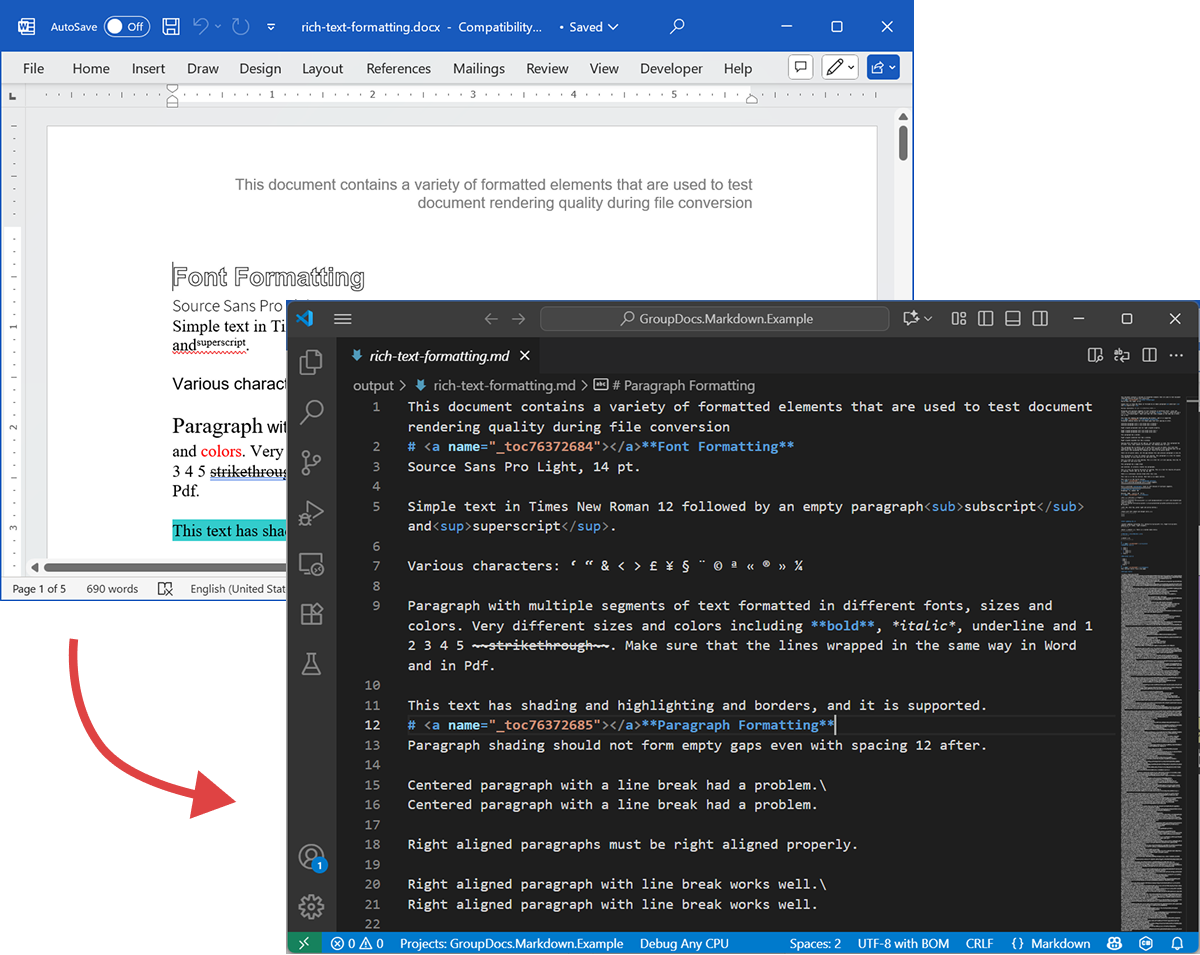
以下のスクリーンショットは、入力 DOCX ファイルと出力 Markdown を示しています。
ライセンスなしで実行すると、評価モードではページ数が制限されます(例: 最初の 3 ページ)。フル機能を試すには、一時ライセンスをリクエストしてください。
一時ライセンスをリクエストするには、Purchase Wizard を開き、連絡先情報を入力し、Contact Details ステップで Get a temporary license をクリックします。一時ライセンスはメールで送付されます。
一時ライセンスの詳細: https://purchase.groupdocs.com/temporary-license/。
対応ファイル形式
GroupDocs.Markdown for .NET は、エンタープライズおよび電子書籍で一般的に使用される幅広い形式に対応しています。サポートされている拡張子の完全な一覧は以下の通りです。
- PDF
pdf
- スプレッドシート
.xls,.xlsx,.xlsb,.xlsm,.xlt,.xltx,.xltm,.xlam,.csv,.tsv,.ods,.ots,.fods,.numbers,.sxc
- Word / リッチテキスト
.doc,.docx,.dot,.dotm,.dotx,.docm,.rtf,.odt,.ott
- 電子書籍
.azw3,.mobi,.epub
- テキスト / マークアップ / ヘルプ
.chm,.xml,.txt
動作概要(内部構造 ― 高レベル)
文書が処理されると、主に次の 2 つのフェーズが実行されます。
-
文書モデル抽出
文書は、段落、見出し、リスト、表、画像、脚注、注釈などの構造要素を表すインメモリオブジェクトモデルにパースされます。パーサは意味情報(例: リストの入れ子、表セル、画像キャプション)を保持するよう努めます。 -
Markdown 生成
オブジェクトモデルを走査し、画像処理方法、表の書式、見出しレベル、特別な注釈などの設定可能な変換オプションに従って Markdown に変換します。結果として得られるのは、RAG パイプラインでインデックス化可能な、読みやすく意味的に整った Markdown ファイルです。
エクスポート例
上記コード例は DOCX を Markdown にエクスポートする方法を示しています。ここではそのコード例を用いて、ソースファイルと出力ファイルを実際に確認します。
ソース DOCX
ソースファイル rich-text-formatting.docx にはさまざまなコンテンツブロックが含まれ、主要な意味要素を強調するように高度にフォーマットされています。
出力 Markdown
出力ファイル rich-text-formatting.md の内容は以下に示されており、生成された Markdown で各フォーマット要素がどのように表現されているかが分かります。
This document contains a variety of formatted elements that are used to test document rendering quality during file conversion
# <a name="_toc76372684"></a>**Font Formatting**
Source Sans Pro Light, 14 pt.
Simple text in Times New Roman 12 followed by an empty paragraph<sub>subscript</sub> and<sup>superscript</sup>.
Various characters: ‘ “ & < > £ ¥ § ¨ © ª « ® » ¼
Paragraph with multiple segments of text formatted in different fonts, sizes and colors. Very different sizes and colors including **bold**, *italic*, underline and 1 2 3 4 5 ~~strikethrough~~. Make sure that the lines wrapped in the same way in Word and in Pdf.
This text has shading and highlighting and borders, and it is supported.
# <a name="_toc76372685"></a>**Paragraph Formatting**
Paragraph shading should not form empty gaps even with spacing 12 after.
Centered paragraph with a line break had a problem.\
Centered paragraph with a line break had a problem.
Right aligned paragraphs must be right aligned properly.
Right aligned paragraph with line break works well.\
Right aligned paragraph with line break works well.
This paragraph has a border.
Right aligned condensed text had a problem.
Right aligned expanded text had a problem.
Spacing after and before do not add up, just the greater is used. This paragraph has 12 after. Also, when indents are different, the shading does not join.
This paragraph has 12 before, but in total there is only 12 above. Also note that shading belongs to the paragraph at the top and shading of this paragraph does not go down unless next paragraph has shading too. There are 24 points below.
There are 24 points above, but the gap between this and previous paragraph is only 24.
This paragraph is a test for double line spacing. This paragraph is a test for double line spacing. It also have 0.5” for the first line.
This is a test for 1.5 line spacing. This is a test for 1.5 line spacing. Also has -0.5” indent for the first line.
This paragraph has a page break
and centered. It actually creates two paragraphs.
This is a test for Exactly 20 points of spacing. This is a test for Exactly 20 points of spacing. TTTTTT (20, 22, 24, 26, 28, 30).
There is a continuous section break after this line.
This line is in the new section. Next here is an empty section.
This line is in the fourth section.
# <a name="_toc76372686"></a>**Paragraph Justify**
This is a justified paragraph with a single segment. 111111111111111111111111111111111111111111.
Also a justified **paragraph** reset to left because of multiple segments. 111111111111111111111111111111111111111111.
# **Non-English Characters**
Wingdings: (x, Symbol: WÄ
Russian: Теперь немного по русски.
# <a name="_toc76372687"></a>**Tables**
|Cell 1.1 Left|Cell 1.2 Right|||
| :- | -: | :- | :- |
|Cell 2.1 Centered vertically|Cell 2.2 with background|Cell 2.3 with line break<br>and coloured border.||
|Cell 3.1 Bottom vertically|<p>Cell 3.2</p><p>Centered</p><p>Horizontally</p>|Cell 3.3 No border||
|Left red, blue top, green right and yellow bottom.|
| :- |
|Table with left indent and merged cells.||||
| :- | :- | :- | :- |
|||||
|||||
**Cell padding etc.**
|<p>Cell padding.</p><p>Top: 0.1, bottom 0.2</p><p>Left: 0.5, Right 0.4</p>|Zero padding on all sides, right aligned.|
| :- | -: |
|Outer 1.1|Outer 1.2. There is a nested table here||
| :- | :-: | -: |
|**Nested 1.1**|**Nested 1.2**|
| :- | :- |
|||Outer 1.3|
| :- | :-: | -: |
#
# <a name="_toc76372688"></a>**Lists**
**Numbered list:**
1. Item 1
1. Item 2
1. Item 2.1
1. Item 2.2
1. Item 3
**Bulleted list:**
- Item 1
- Item 2
- Item 2.1
- Item 2.2
- Item 3
#
# <a name="_toc76372689"></a>**Images**
This section starts from a new page.
**Ellipse text**
There is an image in a black border in the top right corner, but it will drop down into the text. There is also a transparent ellipse with text that overlaps the picture.
Inline JPEG in a separate paragraph.

Inline GIF scaled 50% and WMF scaled 25% in a paragraph. This text is before the image and  this text is after the image.
Images in a table. Left and right aligned.
|||
| :- | -: |
Inline text box  is here and inline ellipse  is here.
New section that starts from a new page is here.
It has portrait orientation and margins.
# <a name="_toc76372690"></a>**Fields**
Merge field «FirstName»
Page number 5
Hyperlink [Aspose.com](http://www.aspose.com)
TOC
[Font Formatting 1](#_toc76372684)
[Paragraph Formatting 1](#_toc76372685)
[Non-English Characters 2](#_toc76372686)
[Tables 2](#_toc76372687)
[Lists 2](#_toc76372688)
[Images 4](#_toc76372689)
[Fields 5](#_toc76372690)
# **Form Fields**
Edit <a name="text1"></a>test text
Checkbox <a name="check1"></a>
Combobox <a name="dropdown1"></a>
# **Footnotes and Endnotes**
This line has a footnote at the end.[^1]
This line has an endnote at the end.[^2]
[^1]: Footnote 1.
[^2]: Endnote 1.
まとめ
GroupDocs.Markdown for .NET は、さまざまな文書形式を LLM + RAG システム向けのセマンティックな Markdown に変換します。文書の構造と意味を保持し、オンプレミスで実行でき、一般的なエンタープライズ形式に対応しているため、AI が大量の文書コレクションを消費できるように準備したい組織にとって実用的な選択肢です。
詳細情報
- 製品ホーム: https://products.groupdocs.com/markdown/net/
- ドキュメント: https://docs.groupdocs.com/markdown/net/
- ライセンス情報: https://about.groupdocs.com/legal/
- ダウンロード: https://releases.groupdocs.com/markdown/net/
サポートとフィードバック
質問や技術的な支援が必要な場合は、Free Support Forum をご利用ください — 喜んでお手伝いします。