Usually, a searching software is able to achieve fast search responses because, instead of searching the text directly, it searches an index. This would be the equivalent of retrieving pages in a book related to a keyword by searching the index at the back of a book, as opposed to searching the words in each page of the book.
Using GroupDocs.Search for Indexing and Searching
Problem: Suppose you have 10 million documents of different file formats, e.g. MS Word, Spreadsheets, Presentations, etc. Due to limited memory size, you cannot store more than 5% of the entire data. Now the main issue is how to apply indexing and searching in this case.
Solution: The GroupDocs.Search for .NET provides many ways to perform search operations on any size of document collections. It is capable in indexing various types of documents and perform searches on it. The API supports searching for:
- Text occurrences
- Basic metadata fields
- File names
- Document types
Moreover, it allows searching on the basis of different search query types. The advanced search (e.g fuzzy search, synonyms search, boolean search) is also supported.
Creating Index
Let’s try the GroupDocs.Search API for indexing the bulk of documents of different file formats(see the supported formats list). Here, let’s create the index on disk. You just need to follow these simple steps:
- Create a directory for Indexing
- Create another directory and copy all the required documents into it.
- Come to the code and firstly initialize Index object by passing the path of the index directory
- Add documents using the Add(“Documents_Folder_Path”) method of the Index object.
The C# code will look like this:
string indexFolder = @"c:\MyIndex\"; // Specify path to the index folder
string documentsFolder = @"c:\MyDocuments\"; // Specify path to the folder with documents

// Creating an index in the specified folder
Index index = new Index(indexFolder);

// Indexing documents from the specified folder
index.Add(documentsFolder);
The example uses the GroupDocs.Search namespace of GroupDocs.Search for .NET 26.10.
Java developers can write the code like this:
String indexFolder = "c:\\MyIndex\\"; // Specify path to the index folder
String documentsFolder = "c:\\MyDocuments\\"; // Specify path to the folder with documents

// Creating an index in the specified folder
Index index = new Index(indexFolder);

// Indexing documents from the specified folder
index.add(documentsFolder);
The Index class is located in the com.groupdocs.search package.
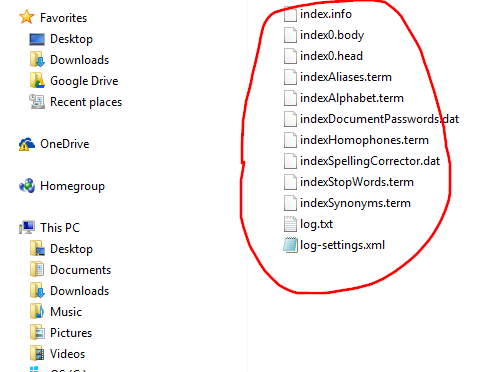
After creating Index you will see the files in the Index folder like following screenshot:
Searching The Terms
The GroupDocs.Search allows various kinds of queries for search operations with more advance features. Please see the documentation for the details.
Let’s come to the code.
Suppose, the index has been already created as described in the above section. Let’s simply search a term. Follow the steps as written below:
- Instantiate Index by passing the index folder path
- Search the term using the Index.Search() method which returns a SearchResult object.
- Show list of searched files
The C# code will look like:
string indexFolder = @"c:\MyIndex\"; // Specify path to the index folder

// Opening the existing index from the specified folder
Index index = new Index(indexFolder);

// Searching for the word 'book'
SearchResult result = index.Search("book");

// Showing the list of found files
Console.WriteLine("Documents: " + result.DocumentCount);
for (int i = 0; i < result.DocumentCount; i++)
{
    FoundDocument document = result.GetFoundDocument(i);
    Console.WriteLine(document.DocumentInfo.FilePath);
}
Java developers can write the code like this:
String indexFolder = "c:\\MyIndex\\"; // Specify path to the index folder

// Opening the existing index from the specified folder
Index index = new Index(indexFolder);

// Searching for the word 'book'
SearchResult result = index.search("book");

// Showing the list of found files
System.out.println("Documents: " + result.getDocumentCount());
for (int i = 0; i < result.getDocumentCount(); i++) {
    FoundDocument document = result.getFoundDocument(i);
    System.out.println(document.getDocumentInfo().getFilePath());
}
The SearchResult and FoundDocument classes are located in the GroupDocs.Search.Results namespace (com.groupdocs.search.results package in Java).
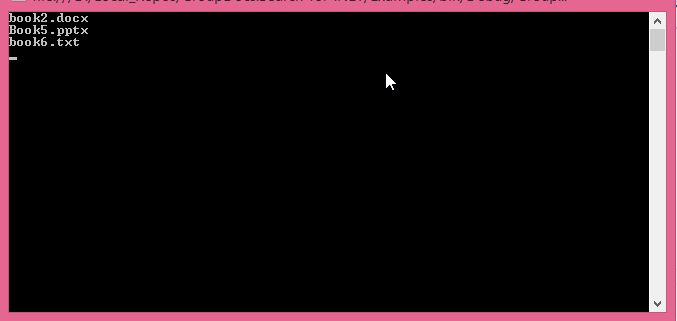
The output will be appeared like the following screenshot:
The complete ready-to-run code samples are available on GitHub.