ทำให้เอกสารองค์กรของคุณพร้อมสำหรับ AI — อย่างเชื่อถือได้, ทำงานบนเครื่องของคุณ, และมีความหมายเชิงเซมานติก
เป็นกรณีที่พบได้บ่อยที่องค์กรเก็บเอกสารของตนในรูปแบบ PDF, DOCX, XLSX และ ePub ในขณะที่ LLM (large language models) ทำงานได้ดีกับ HTML หรือข้อความธรรมดา รูปแบบเอกสารดั้งเดิมเหล่านี้ต้องผ่านการแปลงก่อนจึงจะใช้ได้อย่างมีประสิทธิภาพในสายงาน LLM + RAG ที่เราต้องการสนทนากับเอกสารหรือชุดเอกสาร
LLM (Large Language Model) — โมเดล AI ที่ผ่านการฝึกล่วงหน้าและสร้างข้อความและคำตอบโดยอิงจากคอร์ปัสข้อความขนาดใหญ่
RAG (Retrieval‑Augmented Generation) — วิธีการที่ผสาน LLM กับฐานความรู้ภายนอก (เช่น เอกสารองค์กร) เพื่อให้โมเดลสามารถดึงข้อมูลและให้เหตุผลเกี่ยวกับเนื้อหาในโดเมนได้
แผนภาพลำดับต่อไปนี้แสดงขั้นตอนทั่วไปที่เกี่ยวข้องกับการสร้างคำตอบต่อคำถาม:
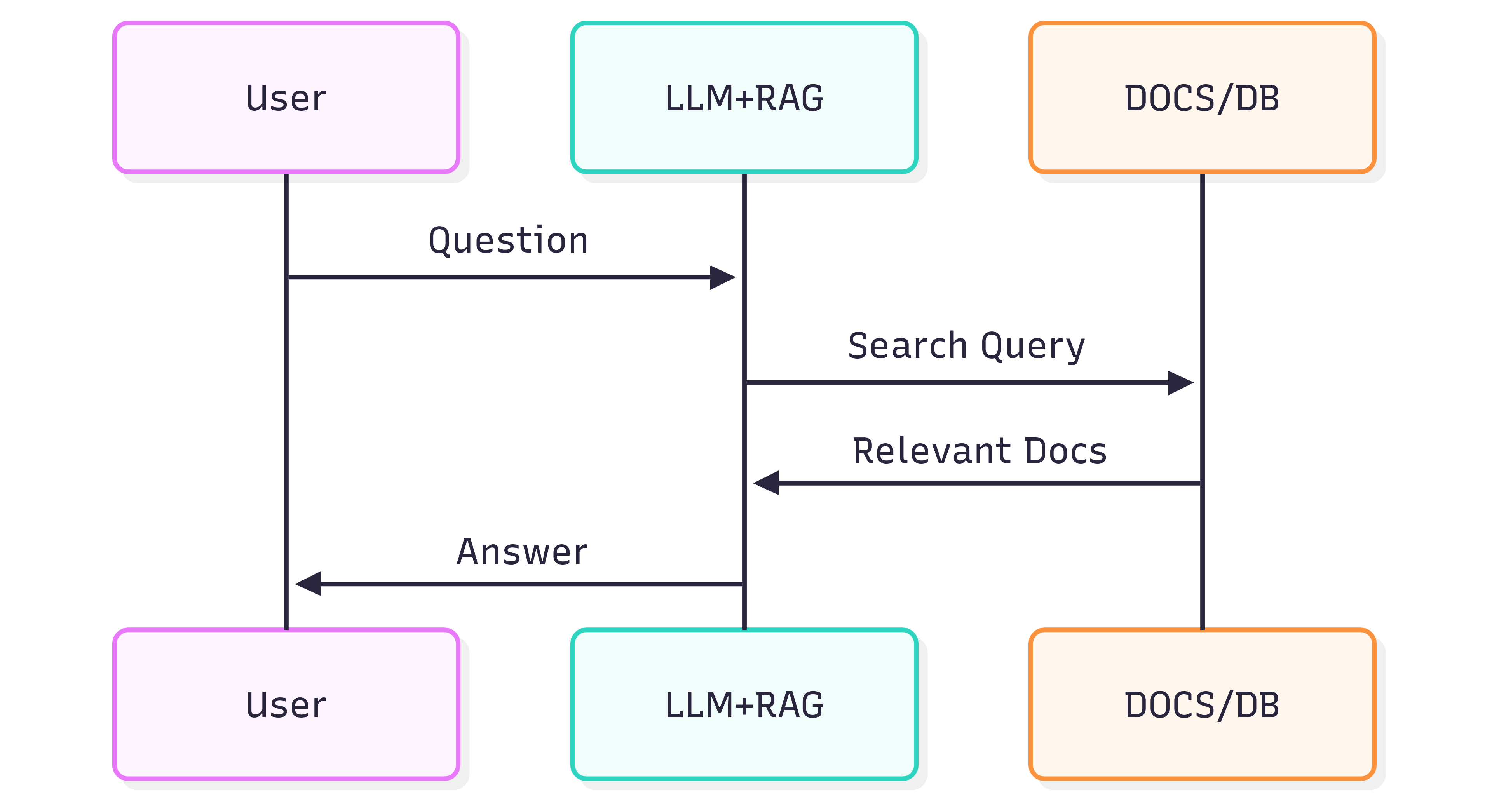
คุณภาพของคำตอบที่คุณได้รับจากระบบ (LLM + RAG) ขึ้นอยู่กับทั้งระบบเองและความสามารถของเอกสารต้นทางในการรักษาโครงสร้างและความหมายเมื่อถูกป้อนเข้าสู่กระบวนการดึงข้อมูล
ปัญหา
การจัดรูปแบบเอกสารไม่ได้เป็นเพียงแค่การมองเห็น — มันยังบรรจุความหมายเชิงเซมานติก หัวข้อ, รายการ, ตาราง, การเน้นแบบหนา/เอียง, คำอธิบายภาพ, และรูปภาพในบรรทัดทั้งหมดสื่อความหมายที่ช่วยให้ LLM เข้าใจบริบทได้ การแปลงเอกสารอย่างหยาบ (เช่น การใช้ OCR ที่ถือทุกหน้าเป็นภาพแบน) มักทำให้ความหมายเหล่านี้หายไป ส่งผลให้การดึงข้อมูล RAG และคำตอบจาก LLM ด้านล่างอาจไม่แม่นยำหรือมีเสียงรบกวน
OCR สามารถช่วยได้สำหรับเอกสารสแกน แต่บ่อยครั้งจะทำลายโครงสร้าง (รายการที่ตัดขาดระหว่างหน้า, เส้นขอบตารางที่ตีความผิด, การอ้างอิงที่หายไป) นอกจากนี้ยังเพิ่มค่าใช้จ่ายและภาระโครงสร้างพื้นฐานเมื่อประมวลผลคลังข้อมูลขนาดใหญ่
วิธีแก้ไข
แนวทางทางเลือกคือการแยกวิเคราะห์เอกสารโดยคำนึงถึงโครงสร้างและส่งออกโครงสร้างนั้นเป็นรูปแบบที่เป็นมิตรต่อ LLM — Markdown Markdown มีน้ำหนักเบา, รองรับอย่างกว้างขวาง, และรักษาหัวข้อ, รายการ, ตาราง, บล็อกโค้ด, การเน้น, คำอธิบายภาพ, และการอ้างอิงรูปภาพ — ซึ่งเป็นคุณลักษณะที่ช่วยปรับปรุงคุณภาพการดึงข้อมูล
GroupDocs.Markdown for .NET แปลงรูปแบบเอกสารยอดนิยม (PDF, DOCX, XLSX, ePub และอื่น ๆ) เป็น Markdown ที่สะอาดและมีความหมาย เหมาะสำหรับการนำเข้าเข้าสู่ระบบ RAG เป็นไลบรารี .NET ที่ทำงานบนเครื่องของคุณ — การประมวลผลทั้งหมดเกิดขึ้นภายในสภาพแวดล้อมของคุณ ไม่ต้องพึ่งบริการภายนอก, ไม่เสี่ยงข้อมูลรั่วไหล, และไม่ต้องพึ่ง GPU ระยะไกล
วิธีเริ่มต้น
GroupDocs.Markdown for .NET มีให้ดาวน์โหลดเป็นแพคเกจ NuGet, รวมถึงไฟล์ MSI และ ZIP
ติดตั้งแพคเกจ NuGet ด้วย .NET CLI:
dotnet add package GroupDocs.Markdown
หรือดาวน์โหลดตัวติดตั้งและแอสเซมบลีจากหน้าดาวน์โหลดอย่างเป็นทางการ: https://releases.groupdocs.com/markdown/net/
ตัวอย่างการใช้งาน (เพิ่มใน Program.cs):
// Import the namespace
using GroupDocs.Markdown;

// Set the license (optional for evaluation)
License.Set("GroupDocs.Markdown.lic");

// Instantiate the converter for a source document
var converter = new MarkdownConverter("rich-text-formatting.docx");

// Convert and save output to file
converter.Convert("rich-text-formatting.md");
ไฟล์ rich-text-formatting.md ที่แปลงแล้วจะถูกบันทึกในโฟลเดอร์เดียวกับแอปพลิเคชันของคุณ
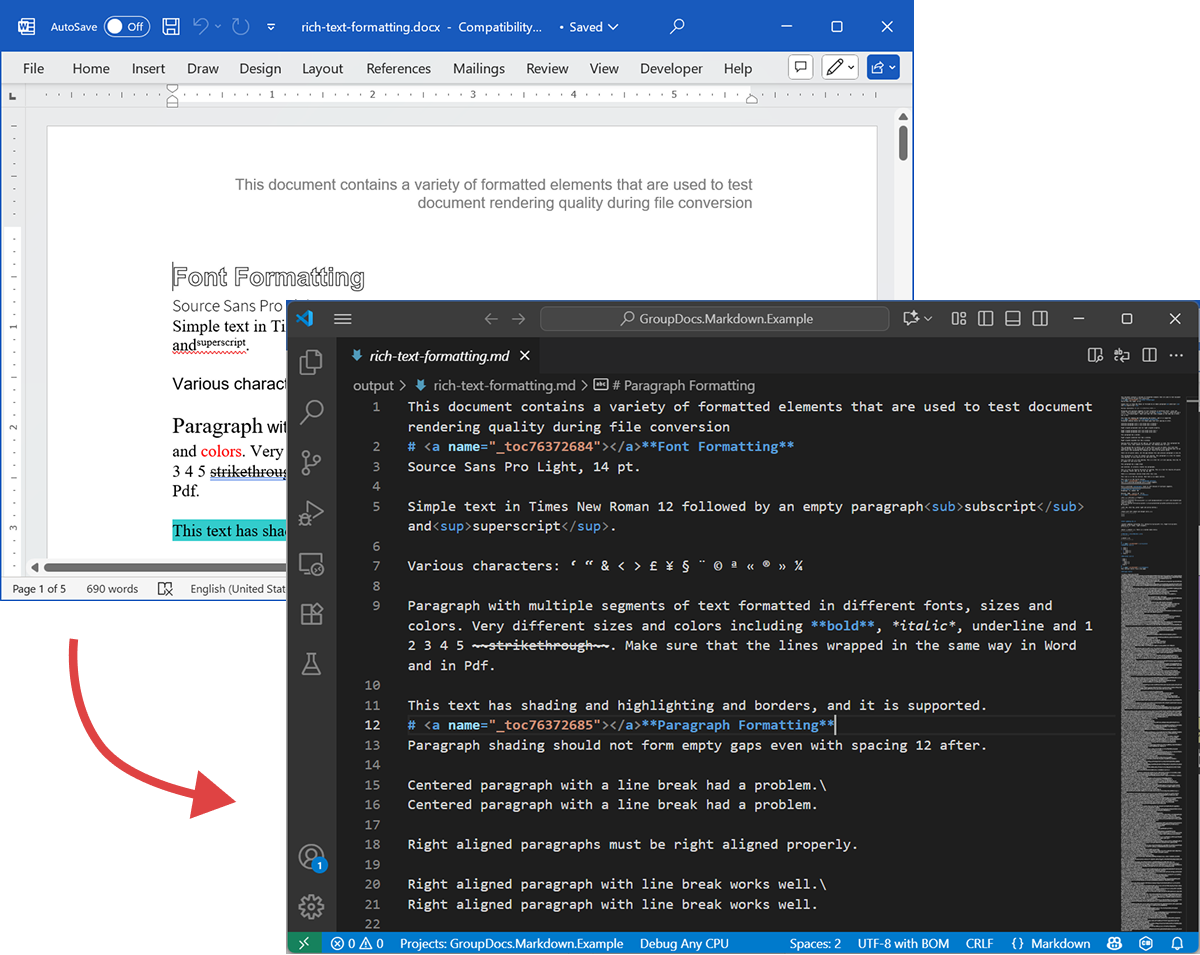
ภาพหน้าจอต่อไปนี้แสดงไฟล์ DOCX อินพุตและ Markdown เอาต์พุต
หากคุณรันโดยไม่มีใบอนุญาต โหมดประเมินผลจะประมวลผลจำนวนหน้าที่จำกัด (เช่น หน้าแรกสามหน้า) หากต้องการทดลองใช้ผลิตภัณฑ์เต็มรูปแบบ ให้ขอใบอนุญาตชั่วคราว
เพื่อขอใบอนุญาตชั่วคราว ให้เปิด วิซาร์ดการสั่งซื้อ (https://purchase.groupdocs.com/buy/cart?ppId=115659&utm_source=blog), ใส่ข้อมูลติดต่อ, แล้วคลิก รับใบอนุญาตชั่วคราว ในขั้นตอน รายละเอียดการติดต่อ ใบอนุญาตชั่วคราวจะถูกส่งทางอีเมลให้คุณ
เรียนรู้เพิ่มเติมเกี่ยวกับใบอนุญาตชั่วคราว: https://purchase.groupdocs.com/temporary-license/
รูปแบบไฟล์ที่รองรับ
GroupDocs.Markdown for .NET รองรับชุดรูปแบบไฟล์ที่หลากหลายสำหรับองค์กรและอีบุ๊ค รายการเต็มของส่วนขยายที่รองรับมีดังนี้
- PDF
pdf
- สเปรดชีต
.xls,.xlsx,.xlsb,.xlsm,.xlt,.xltx,.xltm,.xlam,.csv,.tsv,.ods,.ots,.fods,.numbers,.sxc
- Word / Rich Text
.doc,.docx,.dot,.dotm,.dotx,.docm,.rtf,.odt,.ott
- อีบุ๊ค
.azw3,.mobi,.epub
- ข้อความ / มาร์กอัป / ช่วยเหลือ
.chm,.xml,.txt
วิธีทำงาน (ภายใน — ระดับสูง)
เมื่อเอกสารถูกประมวลผล จะเกิดสองขั้นตอนหลัก
-
การสกัดโมเดลเอกสาร
เอกสารถูกแยกวิเคราะห์เป็นโมเดลอ็อบเจ็กต์ในหน่วยความจำที่แสดงถึงองค์ประกอบเชิงโครงสร้าง (ย่อหน้า, หัวข้อ, รายการ, ตาราง, รูปภาพ, หมายเหตุ, คำอธิบาย, ฯลฯ) ตัวพาร์เซอร์พยายามรักษาเซมานติก (เช่น การซ้อนรายการ, เซลล์ตาราง, คำอธิบายรูปภาพ) -
การสร้าง Markdown
โมเดลอ็อบเจ็กต์จะถูกเดินผ่านและแปลงเป็น Markdown ตามตัวเลือกการแปลงที่กำหนดค่าได้ (วิธีจัดการรูปภาพ, การจัดรูปแบบตาราง, ระดับหัวข้อ, คำอธิบายพิเศษ ฯลฯ) ผลลัพธ์คือไฟล์ Markdown ที่อ่านง่ายและมีความหมายเชิงเซมานติก พร้อมสำหรับการทำดัชนีโดยสายงาน RAG ของคุณ
ตัวอย่างการส่งออก
โค้ดตัวอย่างข้างต้นแสดงวิธีส่งออก DOCX เป็น Markdown เราจะใช้โค้ดนี้เป็นตัวอย่างและดูไฟล์ต้นฉบับและไฟล์ผลลัพธ์เพื่อสาธิต
DOCX ต้นฉบับ
ไฟล์ต้นฉบับ rich-text-formatting.docx มีบล็อกเนื้อหาต่าง ๆ และจัดรูปแบบอย่างหนักเพื่อเน้นองค์ประกอบเชิงเซมานติกหลัก
Markdown ผลลัพธ์
เนื้อหาเอาต์พุตของ rich-text-formatting.md แสดงด้านล่าง แสดงว่าตัวองค์ประกอบการจัดรูปแบบต่าง ๆ ถูกแสดงอย่างไรในไฟล์ Markdown ที่สร้างขึ้น
This document contains a variety of formatted elements that are used to test document rendering quality during file conversion
# <a name="_toc76372684"></a>**Font Formatting**
Source Sans Pro Light, 14 pt.
Simple text in Times New Roman 12 followed by an empty paragraph<sub>subscript</sub> and<sup>superscript</sup>.
Various characters: ‘ “ & < > £ ¥ § ¨ © ª « ® » ¼
Paragraph with multiple segments of text formatted in different fonts, sizes and colors. Very different sizes and colors including **bold**, *italic*, underline and 1 2 3 4 5 ~~strikethrough~~. Make sure that the lines wrapped in the same way in Word and in Pdf.
This text has shading and highlighting and borders, and it is supported.
# <a name="_toc76372685"></a>**Paragraph Formatting**
Paragraph shading should not form empty gaps even with spacing 12 after.
Centered paragraph with a line break had a problem.\
Centered paragraph with a line break had a problem.
Right aligned paragraphs must be right aligned properly.
Right aligned paragraph with line break works well.\
Right aligned paragraph with line break works well.
This paragraph has a border.
Right aligned condensed text had a problem.
Right aligned expanded text had a problem.
Spacing after and before do not add up, just the greater is used. This paragraph has 12 after. Also, when indents are different, the shading does not join.
This paragraph has 12 before, but in total there is only 12 above. Also note that shading belongs to the paragraph at the top and shading of this paragraph does not go down unless next paragraph has shading too. There are 24 points below.
There are 24 points above, but the gap between this and previous paragraph is only 24.
This paragraph is a test for double line spacing. This paragraph is a test for double line spacing. It also have 0.5” for the first line.
This is a test for 1.5 line spacing. This is a test for 1.5 line spacing. Also has -0.5” indent for the first line.
This paragraph has a page break
and centered. It actually creates two paragraphs.
This is a test for Exactly 20 points of spacing. This is a test for Exactly 20 points of spacing. TTTTTT (20, 22, 24, 26, 28, 30).
There is a continuous section break after this line.
This line is in the new section. Next here is an empty section.
This line is in the fourth section.
# <a name="_toc76372686"></a>**Paragraph Justify**
This is a justified paragraph with a single segment. 111111111111111111111111111111111111111111.
Also a justified **paragraph** reset to left because of multiple segments. 111111111111111111111111111111111111111111.
# **Non-English Characters**
Wingdings: (x, Symbol: WÄ
Russian: Теперь немного по русски.
# <a name="_toc76372687"></a>**Tables**
|Cell 1.1 Left|Cell 1.2 Right|||
| :- | -: | :- | :- |
|Cell 2.1 Centered vertically|Cell 2.2 with background|Cell 2.3 with line break<br>and coloured border.||
|Cell 3.1 Bottom vertically|<p>Cell 3.2</p><p>Centered</p><p>Horizontally</p>|Cell 3.3 No border||
|Left red, blue top, green right and yellow bottom.|
| :- |
|Table with left indent and merged cells.||||
| :- | :- | :- | :- |
|||||
|||||
**Cell padding etc.**
|<p>Cell padding.</p><p>Top: 0.1, bottom 0.2</p><p>Left: 0.5, Right 0.4</p>|Zero padding on all sides, right aligned.|
| :- | -: |
|Outer 1.1|Outer 1.2. There is a nested table here||
| :- | :-: | -: |
|**Nested 1.1**|**Nested 1.2**|
| :- | :- |
|||Outer 1.3|
| :- | :-: | -: |
#
# <a name="_toc76372688"></a>**Lists**
**Numbered list:**
1. Item 1
1. Item 2
1. Item 2.1
1. Item 2.2
1. Item 3
**Bulleted list:**
- Item 1
- Item 2
- Item 2.1
- Item 2.2
- Item 3
#
# <a name="_toc76372689"></a>**Images**
This section starts from a new page.
**Ellipse text**
There is an image in a black border in the top right corner, but it will drop down into the text. There is also a transparent ellipse with text that overlaps the picture.
Inline JPEG in a separate paragraph.

Inline GIF scaled 50% and WMF scaled 25% in a paragraph. This text is before the image and  this text is after the image.
Images in a table. Left and right aligned.
|||
| :- | -: |
Inline text box  is here and inline ellipse  is here.
New section that starts from a new page is here.
It has portrait orientation and margins.
# <a name="_toc76372690"></a>**Fields**
Merge field «FirstName»
Page number 5
Hyperlink [Aspose.com](http://www.aspose.com)
TOC
[Font Formatting 1](#_toc76372684)
[Paragraph Formatting 1](#_toc76372685)
[Non-English Characters 2](#_toc76372686)
[Tables 2](#_toc76372687)
[Lists 2](#_toc76372688)
[Images 4](#_toc76372689)
[Fields 5](#_toc76372690)
# **Form Fields**
Edit <a name="text1"></a>test text
Checkbox <a name="check1"></a>
Combobox <a name="dropdown1"></a>
# **Footnotes and Endnotes**
This line has a footnote at the end.[^1]
This line has an endnote at the end.[^2]
[^1]: Footnote 1.
[^2]: Endnote 1.
สรุป
GroupDocs.Markdown for .NET ช่วยคุณแปลงรูปแบบเอกสารหลากหลายเป็น Markdown เชิงเซมานติกที่พร้อมสำหรับระบบ LLM + RAG มันรักษาโครงสร้างและความหมายของเอกสาร ทำงานบนเครื่องของคุณ และรองรับรูปแบบไฟล์องค์กรทั่วไป — ทำให้เป็นตัวเลือกที่ใช้งานได้จริงสำหรับองค์กรที่ต้องเตรียมคอลเลกชันเอกสารขนาดใหญ่สำหรับการบริโภคโดย AI
เรียนรู้เพิ่มเติม
- หน้าแรกของผลิตภัณฑ์: https://products.groupdocs.com/markdown/net/
- เอกสารประกอบ: https://docs.groupdocs.com/markdown/net/
- ข้อมูลใบอนุญาต: https://about.groupdocs.com/legal/
- ดาวน์โหลด: https://releases.groupdocs.com/markdown/net/
การสนับสนุน & ข้อเสนอแนะ
สำหรับคำถามหรือความช่วยเหลือด้านเทคนิค โปรดใช้ Free Support Forum ของเรา (https://forum.groupdocs.com/) — เรายินดีให้ความช่วยเหลือ.